Async ADS Read
Asynchronous reading of an ADS symbol described at the input via AMS Net Id, Port, Index Group and Index Offset. The read command is sent from Simulink® with a positive edge at the trigger port.
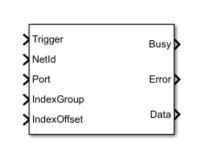
Port description
Port Name | Data type | Description |
|---|---|---|
Trigger | boolean | Block sends read command on positive edge. |
NetId | uint8 | AMS Net Id of the target system |
Port | uint16 | Port of the ADS device |
IndexGroup | uint32 | Index group |
IndexOffset | uint32 | Index offset |
Busy | boolean | TRUE from sending the request until receiving the response from the server |
Error | int32 | Errorcode. Important: Pending is displayed as an error code. |
Data | configurable | See Output Datatype and Dimension in Block Parameter |
Block Parameter
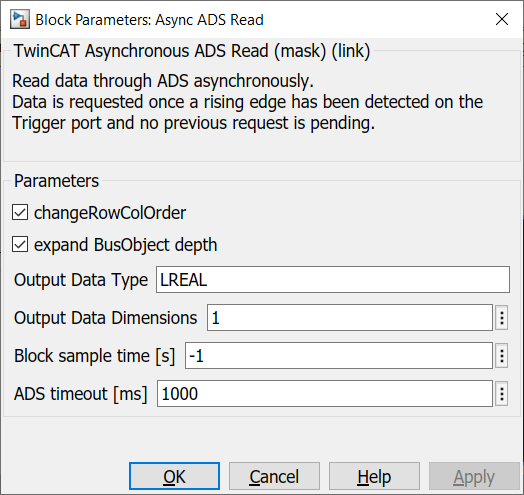
Parameter | Description |
|---|---|
"Change Row Col Order" | Transposes the data to the ordinary representation in Simulink®. |
Output Data Type | TwinCAT primary data type, e.g. UINT, LINT, REAL, … |
Output Data Dimensions | Dimension, e.g. 5, [2.3], … |
Block sample time [s] | Sample Time of the block (Default -1 = Simulink Sample Time) |
ADS timeout [ms] | Timeout for ADS call |
Sample
An example model can be built as follows:
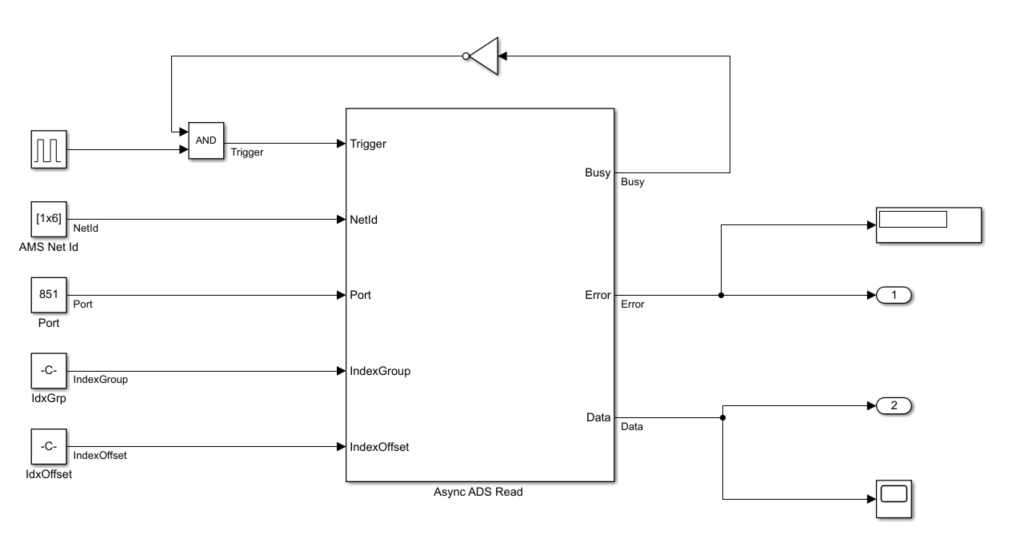
- The Const blocks carry the ADS address information here.
- The AMS Net Id is passed as an array, e.g. [192,168,226,1,1,1].
- For Index Group and Index Offset please note that usually in TwinCAT (for example in the Target Browser) the information is given in hexadecimal. It is a good idea to use the hex2dec command, e.g. hex2dec('5DFF0').
- Busy output feedback is used to prevent a next request from being made during one request.