Signing files (protection against unauthorized changes)
By signing project components (files), you ensure that individual components cannot be replaced without authorization.
 | You should also sign the project file itself, since the information on which components must be signed is stored there. |
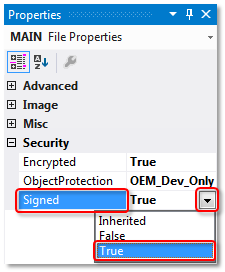
If the project is linked to a user database, you can set the signing in the properties of the respective project component. Mark the project components in the Solution Explorer and set the value of the Signed property in the Properties view to TRUE.
System requirements
Operating system:
- At least Windows 7 (or its Embedded version) is required in order to be able to use all the functions for the protection of the application software. Windows XP and Windows CE (Windows Embedded Compact) do not support either the encryption of the boot file or OEM licenses.
TwinCAT version:
- The functionalities described require TwinCAT 3.1 build 4022 or higher.
| Reliable protection only when using the latest TwinCAT 3 version For reliable protection (e.g. secure encryption), always use the latest TwinCAT 3 version. This provides the maximum security. Use at least TwinCAT 3.1 Build 4024.x. |