Adding the Tc3 XTS Utility library
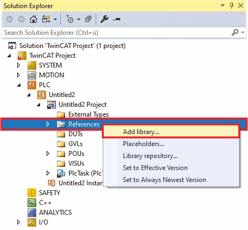
- ►Expand Solution Explorer > TwinCAT Project > PLC > Untitled > Untitled Project
- ►Right-click on References to open the context menu
- ►In the context menu click on Add library ...
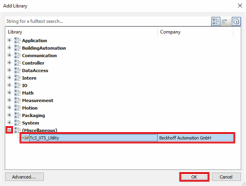
The dialog box Add Library opens.
- ►Expand (Miscellaneous)
- ►Click on Tc3_XTS_Utility
- ►Confirm with OK
The Tc3_XTS_Utility library is added.