Virtual switch
The EP6601-0002 in the TwinCAT system act as a virtual switch, with the EtherCAT system as the "backbone".
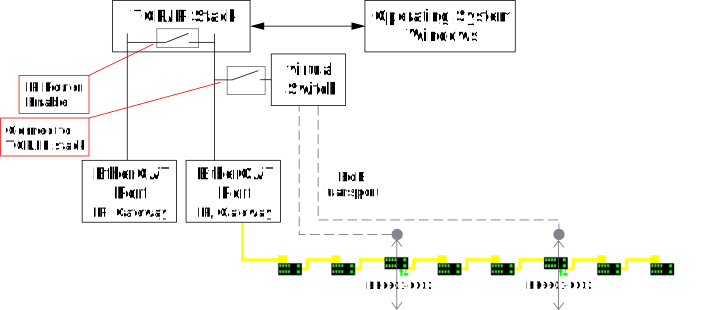
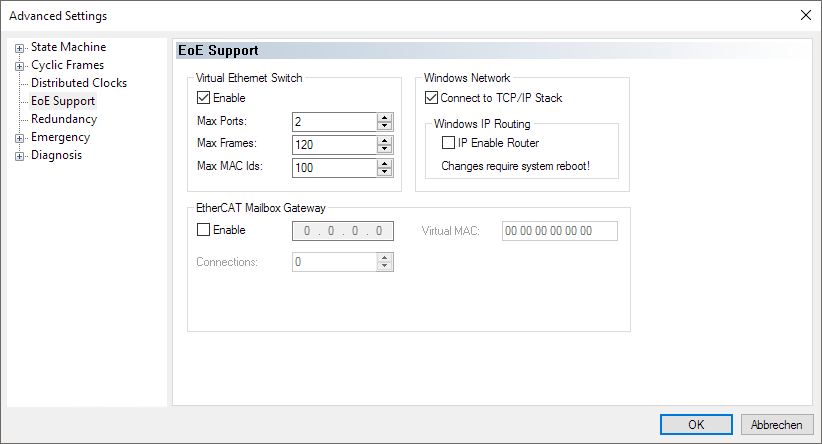
The settings for this can be found under TwinCAT > EtherCAT device > "Advanced Settings".
Notes
- If there are a large number of EP6601-0002 or EL6601 in the EtherCAT segment, it may be useful to increase the specification "Max Frames".
- If the EP6601-0002 is used exclusively to transfer network variables, "Connect to TCP/IP Stack" should be disabled. See chapter Virtual switch.
- IP-routing is enabled by default. This can also be checked by entering "
ipconfig /all" on the command line (Windows)