Sample: EL6692 bridge terminal
 | Using the sample programs This document contains sample applications of our products for certain areas of application. The application notices provided here are based on typical features of our products and only serve as samples. The notices contained in this document explicitly do not refer to specific applications. The customer is therefore responsible for assessing and deciding whether the product is suitable for a particular application. We accept no responsibility for the completeness and correctness of the source code contained in this document. We reserve the right to modify the content of this document at any time and accept no responsibility for errors and missing information. |
In this example, two Beckhoff IPCs with TwinCAT 2.11, b1539, will be synchronized with each other. One PC is the master clock, the second (slave clock) synchronizes its ‘time’ to the first. As the fieldbus, EtherCAT makes the necessary operating resources available, in particular EtherCAT’s own synchronization mechanism, distributed clocks.
The procedure is as explained in the previous chapter.
The following must be observed:
- The master PC works autonomously on the basis of its DC time
- Following the start of TwinCAT, the slave PC readjusts its distributed clocks time to the master IPC:
- at the start of EtherCAT, the initial offset between the two times is determined.
- the subsequent adjustment keeps this offset constant and makes it known.
- the readjustment takes place continuously.
- In the case of failure of the synchronization (interruption of the connection, restart of one of the systems), the behavior is as follows:
- If the adjustment restarts in the slave PC, a new offset is calculated there and made known.
- the application must therefore continuously observe this offset.
- The local DC time must still be used for tasks related to the respective station hardware (EtherCAT slaves, terminals).
- The EtherCAT cycle time must be identical in both systems.
- If different configurations are used in the two systems, i. e. the number, type and/or order of the slaves is different, the automatically calculated shift times will also differ.
Sample: Both systems use an EL2202-0100, which are both supposed to switch their output at the same time. A constant difference is measured, since different output shift times were calculated.
In the system with the smaller output shift time the shift time of the other system should be entered.
Notice | |
Effect on devices when changing the shift times Side effects relating to the function of the other slaves when the shift times are changed should be taken into account! |
- In a controlled system the time offset between the systems is subject to certain fluctuations.
 Sample program (Download), TwinCAT 2.11
Pay attention in the program to the use of ‘signed’ and ‘unsigned’ 64-bit variables as required.
Topology
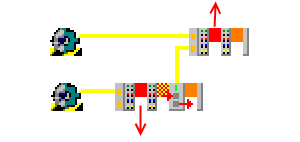 Fig.296: Topology of the sample program
Station Master: EK1100, EL2202, EL6692
Station Slave: EK1100, EL2202
In this example, the EL6692 is synchronized in the direction PrimarySide --> SecondarySide (RJ45 connection). Synchronization in the other direction is also possible.
| EL6692 documentation Please note the information in the EL6692 documentation regarding the system behavior of this terminal. |
Demo program
In this demo program, the slave’s own local DC time from the ReferenceClock in the EtherCAT segment is offset by the time difference to the external synchronization device. This calculation therefore only makes sense on a platform that is a synchronization slave to a master.
The synchronization route can be
- another EtherCAT system, means: Beckhoff EL6692 bridge terminal (this example)
- an IEEE1588 system, means: Beckhoff EL6688 PTP terminal
- any timer with time information (GPS, radio clock), means: TwinCAT Supplement "External synchronization"
The principle:
TwinCAT cyclically receives (e.g. every second) a pair (64-bit, unit 1 ns) made up of an internal (DC) and an external timestamp. These two timestamps are originally obtained simultaneously. The offset between the two time bases is calculated from the initial difference and made known in the System Manager | EtherCAT device | InfoData.
Furthermore, the slave TwinCAT readjusts its own local DC time from the course of the two timestamps with respect to each other.
Calculations:
- current control deviation = DcToExtOffset - (external timestamp - internal timestamp)
This value ("signed", 64-bit) is compared with an application-specific barrier; if it is met, the validity of the time is output - local synchronized time = local DC time + DcToExtOffset
This "nuLocalTime" ("unsigned", 64-bit) can now be used for data logging and events with a time reference to the master PC clock.
Setting up TwinCAT 2.11
In the following procedure the complete system is set up as follows:
- EL6692 primary side (E-bus): Sync Master (i.e. reference clock)
- EL6692 secondary side (RJ45 sockets): Sync Slave (i.e. synchronized side)
The synchronization direction of the time can be set up the other way around; the instructions must then be followed analogously.
Sync Master side
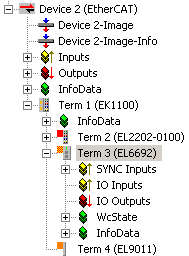 Fig.297: Device on the master side
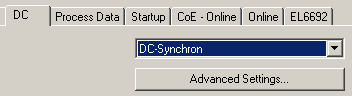 Fig.298: Set the EL6692 PrimarySide to DC
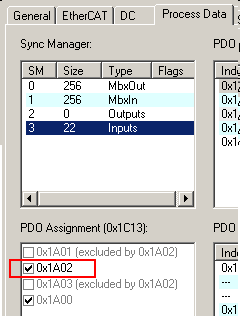 Fig.299: Activate PDO 0x1A02 to display the time stamps
 | Timestamp PDO The activation of the timestamp PDO indicates to the TwinCAT software on the respective side that this side is to be synchronized, i.e. that it is the Sync Slave. |
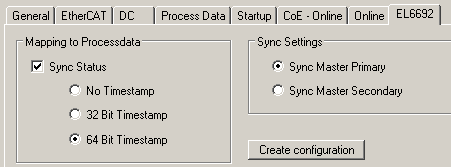 Fig.300: Set the synchronization direction on the PrimarySide;
The figure above shows SyncSettings: Primary --> Secondary
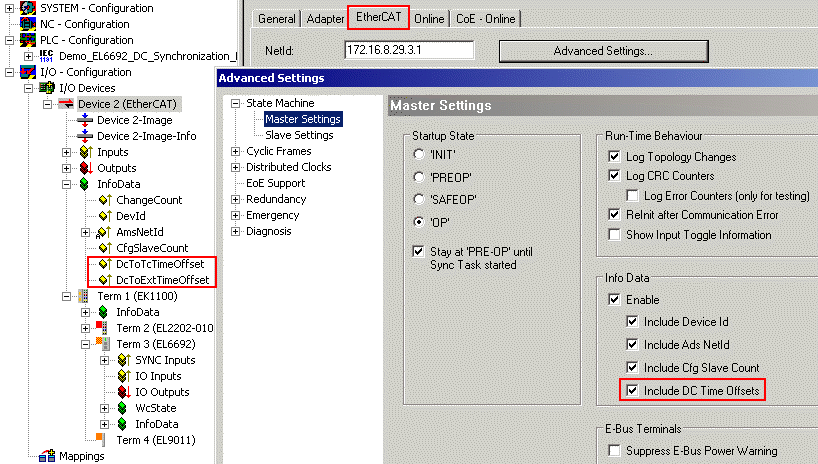 Fig.301: Activate the display of the DC offsets in the EtherCAT master
They can then be evaluated on the master side.
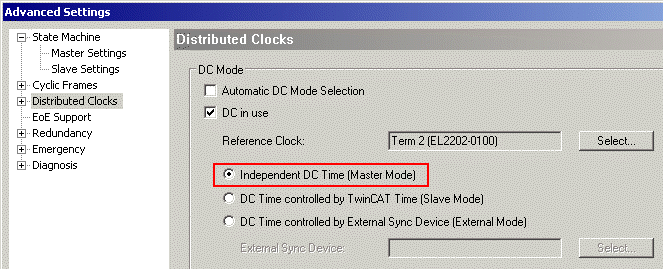 Fig.302: Master PC works with its own ReferenceClock as a basis
TwinCAT can now be activated and started on this side. All devices must be in OP, WorkingCounter = 0, no LostFrames. The EL6692 time stamps on the PrimarySide remain at 0, because the SecondarySide has not yet been configured.
Sync Slave side
The EL6692, SecondarySide is set to DC and 0x1A02 according to Figs. Set the EL6692 PrimarySide to DC and Activate PDO 0x1A02 to display the time stamps.
After reloading the configuration (or restarting in ConfigMode, FreeRun), the synchronization direction can be read out by means of GetConfiguration on the SecondarySide, see the fig. SecondarySide of the EL6692.
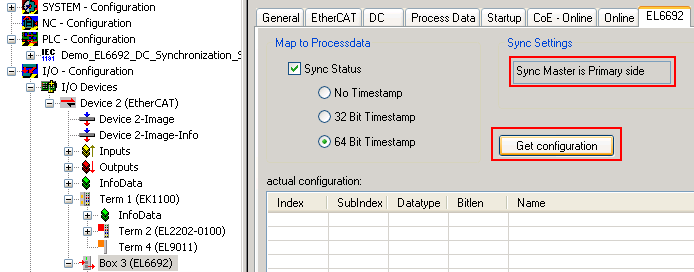 Fig.303: SecondarySide of the EL6692
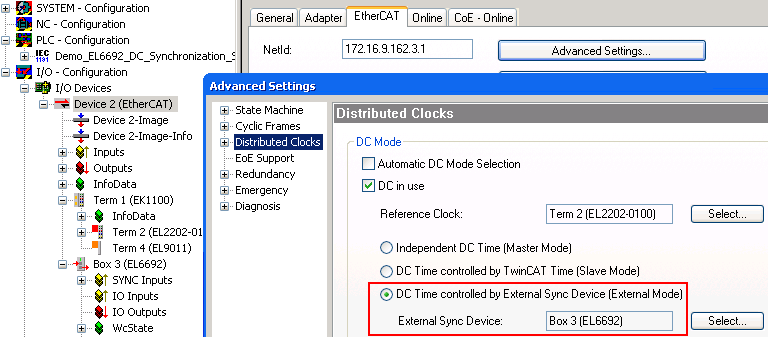 Fig.304: EtherCAT master settings, slave side
After the restart, the DC function of the EL6692 is known to the EtherCAT master; therefore, it now offers this EL6692 as an ExternalSyncDevice in the DC dialogue.
The linking of the following variables is necessary for the evaluations; see the fig. Slave side.
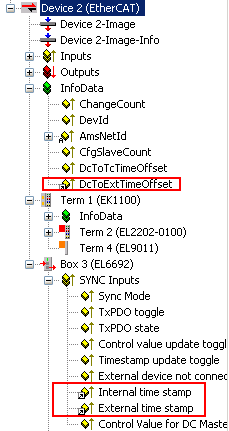 Fig.305: Slave side
Notice | |
Demo program The following screenshots and information refer exclusively to the PLC demo program discussed here and the sample code it contains, and not to the analysis functions of the system manager. |
On the slave side, the start of the synchronization can be observed with the incorporated visualization.
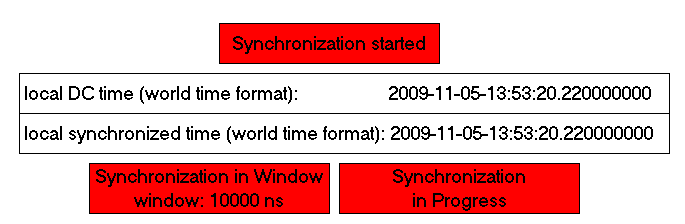 Fig.306: Start slave side
Only the local DC time is available on the slave side immediately after the start.
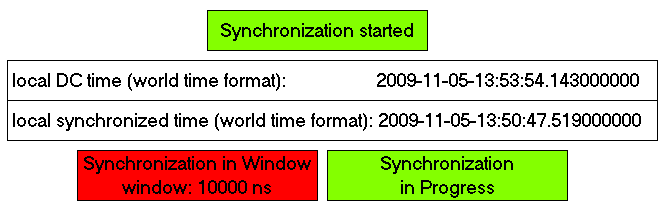 Fig.307: Time stamp known
Following receipt of the first time stamps via the EL6692, the offset is known; in this case it is around 3 minutes different to the time of the IPC used. Synchronization has begun; in this sample a window of ± 10 µs is to be achieved.
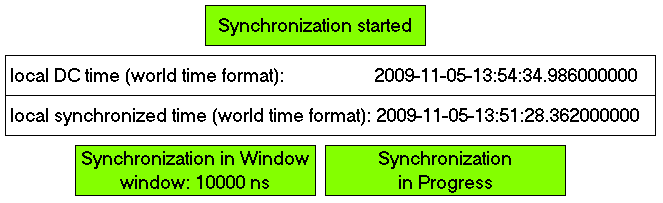 Fig.308: Synchronization successful