| BK9500 - Bus Coupler for USB |
Diagnostic LEDs
After switching on, the Bus Coupler immediately checks the connected configuration. Error-free start-up is indicated when the red I/O ERR LED goes out. If the I/O ERR LED blinks, an error in the area of the terminals is indicated. The error code can be determined from the frequency and number of blinks. This permits rapid rectification of the error.
The Bus Coupler has two groups of LEDs for the display of status. The upper group with four LEDs indicates the status of the respective fieldbus. The significance of the fieldbus status LEDs is explained in the appropriate sections of this manual. It corresponds to the usual fieldbus display.
On the upper right hand side of the Bus Couplers are two more green LEDs that indicate the supply voltage. The left hand LED indicates the presence of the 24 V supply for the Bus Coupler. The right hand LED indicates the presence of the supply to the power contacts.
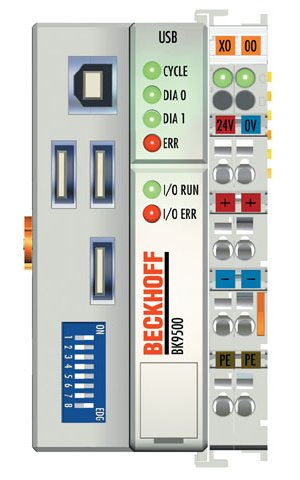
LEDs for power supply diagnostics
LED | Meaning |
|---|---|
Left LED off | Bus Coupler has no power |
Right LED off | No power supply 24 VDC connected at the power contacts |
LEDs for fieldbus diagnostics
LED | On | Off |
|---|---|---|
CYCLE | Cyclic data exchange (isochronous pipes) | No connection present |
DIA 0 | Bulk or control data exchange | No bus traffic present |
DIA 1 | The USB device is being addressed by the host. | No error |
ERROR | Error |
LEDs for K-Bus diagnosis of I/O ERR
Error code | Error code argument | Description | Remedy |
|---|---|---|---|
Persistent, continuous flashing | EMC problems | Check power supply for undervoltage or overvoltage peaks Implement EMC measures If a K-Bus error is present, it can be localized by a restart of the coupler (by switching it off and then on again) | |
1 pulse | 0 | EEPROM checksum error | Set manufacturer's setting with the KS2000 |
1 | Inline code buffer overflow | Connect fewer terminals; too many entries in the table for the programmed configuration | |
2 | Unknown data type | Firmware update necessary for the fieldbus coupler | |
2 pulses | 0 | Programmed configuration incorrect table entry / Bus Coupler | Check programmed configuration for correctness |
(n>0) | Incorrect table comparison (terminal n) | Incorrect table entry / Bus Coupler | |
3 pulses | 0 | Terminal bus command error | No terminal connected; attach terminals. One of the terminals is defective; halve the number of terminals attached and check whether the error is still present with the remaining terminals. Repeat until the defective terminal is located. |
4 pulses | n | Terminal bus data error, break behind terminal n | Check whether the n+1 terminal is correctly connected; replace if necessary. Check whether the End Terminal 9010 is connected. |
5 pulses | n | Terminal bus error in register communication with terminal n | Replace terminal n. |
Error location
The number of pulses indicates the position of the last Bus Terminal before the fault. Passive Bus Terminals, such as a power feed terminal, are not included in the count.
When the error is rectified, the Bus Coupler does not stop flashing. Operating state of the Bus Coupler: Stop. The Bus Coupler can only be re-started by switching off the supply voltage.