DALI Lamp
This module is used to control DALI ballasts. In order to build groups with standard lamps, the original range of 0..254 for an DALI-lamp displayed in percentage. The calculation is linear: 0% means 0 (DALI) , 50% means 127 (DALI) and 100% means 254 (DALI).
Settings
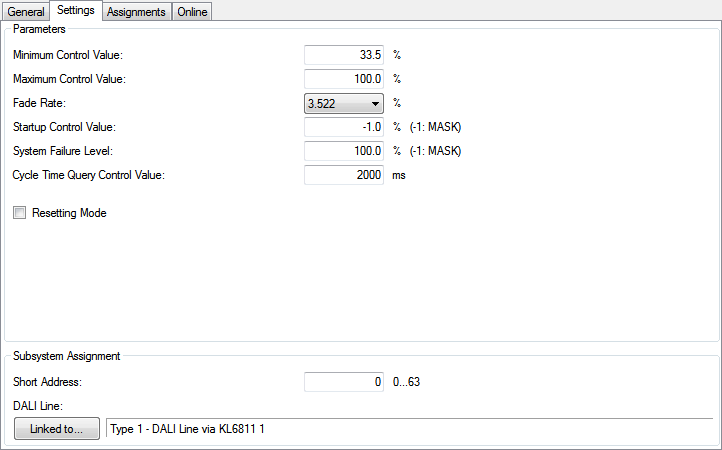
Parameters
- Minimum Control Value: The minimum value, to which the lamp can be dimmed.
- Maximum Control Value: The maximum value, to which the lamp can be dimmed. Changing these values does not affect the ballast internal min and max values, which will always prevail.
- Fade Rate: The amount by which the lamps value is increased / decreased with a Fade Up / Fade Down-command.
- Startup Control Value: Initial value of the lamp, when the PLC-application is started. If the lamp is explicitly set to a value lower than its minimum or greater than its maximum value, it will be automatically set to the appropriate limit. The exception is 0%, which turns the lamp off.
- System Failure Level: The system failure level of the DALI-lamp. This is the level of the lamp in case of a disconnection from the DALI-terminal.
- Cycle Time Query Control Value: Since not all DALI-commands change the ballasts to an absolute value, it is necessary to query the actual value from time to time. This entry defines the interval.
- Resetting Mode: When selected, the last value, before turning the lamp off will be stored. If the lamp is turned on again by the On-command, it will be set back to this value.
Subsystem Assignment
- Short Address: The short address of the assigned DALI-device.
- Linked to...: The DALI-line, at which the ballast is installed, has to be entered here. Once the button is activated, a window will open, where the DALI-terminal can be chosen.
Online
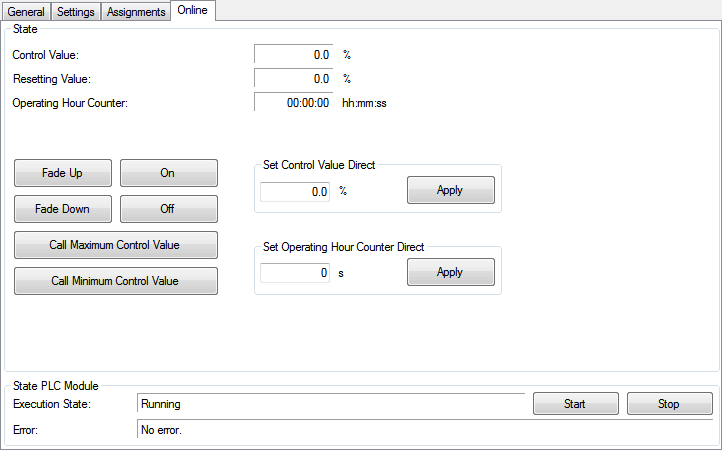
Commands
- Fade Up: This command will increase the light value by the entered fade-rate. The command will only work, when the lamp is already turned on. Increasing the value above the maximum level is not possible.
- Fade Down: This command decreases the light value by the entered fade-rate but will not let a lamp turn off completely.
- On: Turns the lamp either to the maximum or the Resetting Value, which depends on the fact, if the Resetting Mode is activated or not.
- Off: Turns the assigned lamps off. When the Resetting Mode is activated the light value prior to the off-state will be stored.
- Call Maximum Control Value: The lamp will be turned to its maximum level.
- Call Minimum Control Value: The lamp will be turned to its minimum level.
- Set Control Value Direct: The entered value will be taken over, when the Apply-button is pressed. If the lamp is explicitly set to a value lower than its minimum or greater than its maximum value, it will be automatically set to the appropriate limit. The exception is 0%, which turns the lamp off.
- Set Operating Hour Counter Direct: The entered value will be taken over, when the Apply-button is pressed.
State
- Control Value: Actual output value. If the lamp is set to an new value, it will be shown in the Control Value-field first, even if the lamp does not have reached this level, yet, due to a high device internal fade-time. The lamp may slowly dim to its end-level and a short Cycle Time Query Control Value will make the dimming visible. In the end, the lamp will be set closest possible percentage value.
- Resetting Value: When Resetting Mode is selected and the lamp is turned off, the last value, before turning off will be stored. If the lamp is turned on again by the On-command, it will be set back to this value.
- Operating Hour Counter: Service life of the lamp.
State PLC Module
- Execution State: Shows if the module is running or stopped.
- Error: In case of an error, the error code and the error parameter are displayed in this box.
- Start/Stop: Starts/stops the module.