Measured value resolution
You can set the resolution of the measured values for each acceleration axis individually.
Notice | |
Interactions with other parameters Certain combinations of parameter values can cause individual settings to become ineffective without being noticed.
|
- If user calibration or user scale is enabled, the measured value resolution is automatically 1 mg/LSB. The settings described below have no effect.
- If you set a measured value resolution not equal to the factory setting of 1 mg/LSB, the measured value filter is automatically disabled. The filter settings have no effect.
Setting the measured value resolution
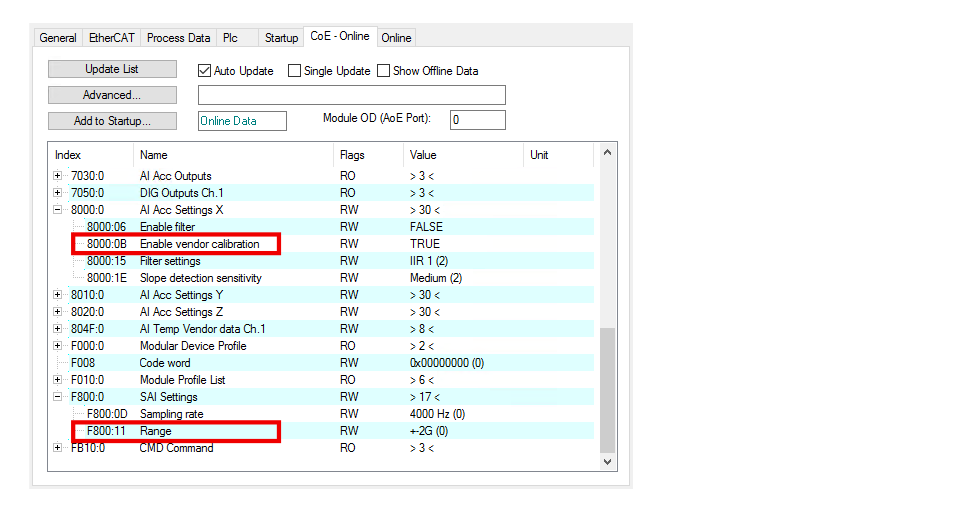
The resolution of the measured values is determined by the following parameters:
- 80n0:0B "EnableVendor Calibration"
(with n=0 for the X-axis, n=1 for the Y-axis, n=2 for the Z-axis) - F800:11 "Range". Further information in chapter Measuring range.
The following table shows the possible combinations of the two parameters and the resulting measured value resolution.
"Enable Vendor Calibration" | "Range" | Measured value resolution | |
|---|---|---|---|
TRUE (factory setting) | variable | 1 mg/LSB | |
FALSE | 0 | +-2G | 1/256 mg/LSB |
FALSE | 1 | +-4G | 1/128 mg/LSB |
FALSE | 2 | +-8G | 1/64 mg/LSB |
Measured value noise
If “Enable vendor calibration” is FALSE, the noise power density increases with a larger measuring range. See chapter Measured value noise.