Commissioning the motor with the NC
- Once the parameters are set, the motor is basically ready for operation. Individual further parameters have to be adapted to the respective application.
- To commission the axis, activate the configuration (Ctrl+Shift+F4), select the axis, select tab Online and enable the axis under Set.
- Set all tick marks and set Override to 100% (see Fig. Enabling an axis). The axis can then be moved.
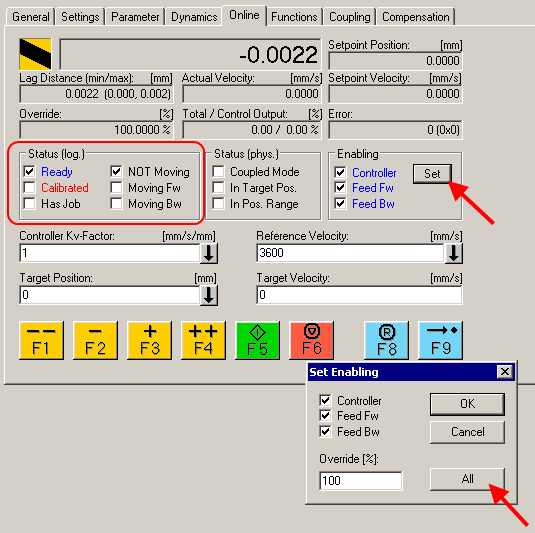 Fig.167: Enabling an axis
You can now move the axis with the function keys F1, F2 (Backward) or F3, F4 (Forward).
You can adjust the Kv factor in order to approach a suitable factor. Set the value to 0 initially in order to set the correct reference velocity. For calculating the reference velocity please refer to section "Selecting the reference velocity". The calculation provides a relatively precise value, although the value may have to be corrected slightly. To this end move the motor with a Kv factor of 0 until the actual velocity matches the setpoint velocity.
Alternatively you can control the axis via the "Functions" tab. An example is provided below.
- Select as Reversing Sequence as the start type.
- Enter the required Target Position1, e.g. 5000°.
- Enter the required Target Velocity, e.g. 2000°/s.
- Enter the required Target Position2, e.g. 0°.
- Enter the required Idle Time, e.g. 1 s.
- Select Start.
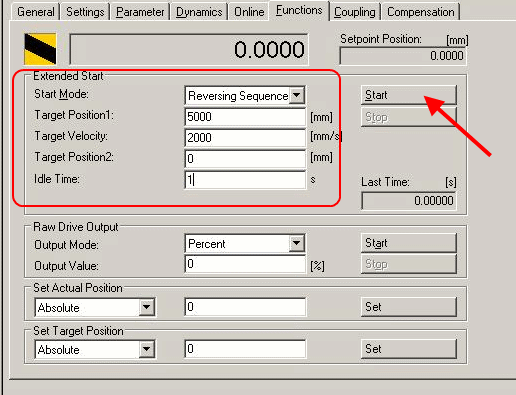
Enabling an axis
The motor now turns to position 1, remains there for 1 seconds and returns to position 2. This is repeated until Stop is pressed.