Stairwell Dimmer
The Stairwell dimmer contains a constant sequence. After a rising trigger at the motion-detector is recognized, the light is turned on to the Presence Value and the sequence is started:
- Waiting for a falling trigger at the motion-detector
- Waiting time on the Presence Value
- Switching to the Prolong Value
- Waiting time on the Prolong Value
- Off-switching
Another rising edge at the motion-detector restarts the sequence anytime.
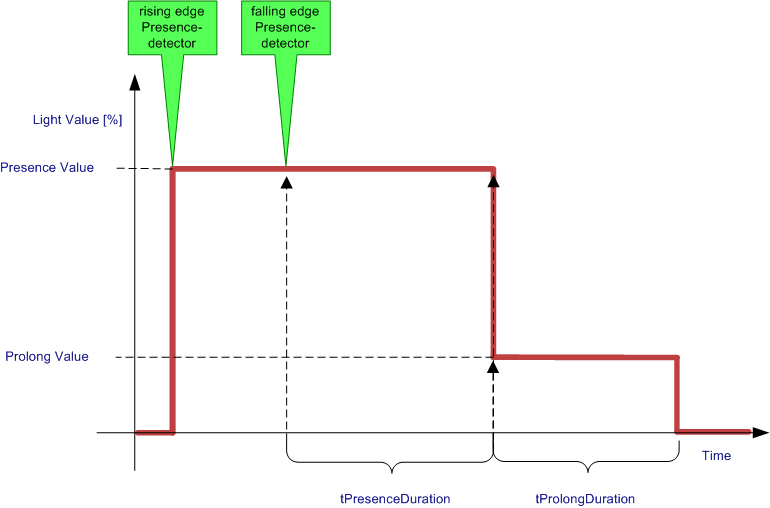
Settings
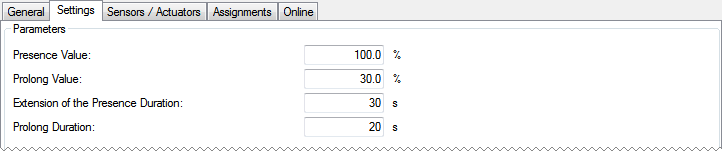
Parameters
- Presence Value: Light value when the sequence is just activated.
- Prolong Value: Light value to signal, that the sequence will be terminated soon.
- Extension of the Presence Duration: Time, the light value stays on the Presence Value after a falling trigger on the motion detector was detected.
- Prolong Duration: Time, the light value stays on the Prolong Value before the light is turned off.
Sensors / Actuators

In this menu the lamp / lamp group has to be entered together with the correspondent digital signal / digital signal group and the motion detection which switches them.
Online
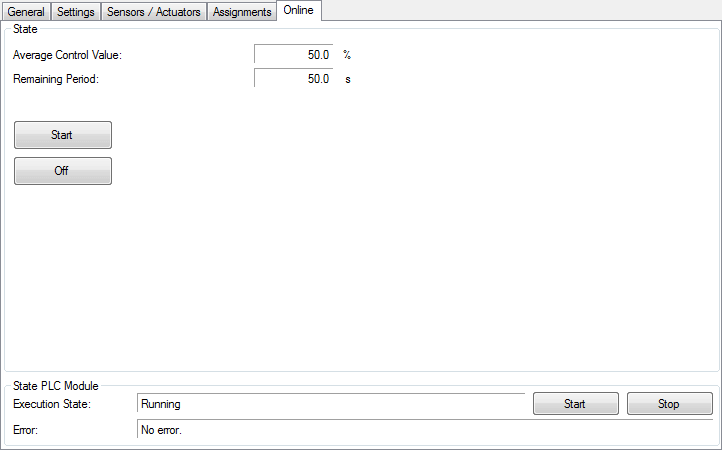
Commands
- Start: With this button it is possible, to start the dim-sequence manually.
- Off: Turns the assigned lamps off and ends the sequence immediately.
State
- Average Control Value: Average value of all active (non-erroneous) lamps.
- Remaining Period: Remaining time until the light will be turned off.
State PLC Module
- Execution State: Shows if the module is running or stopped.
- Error: In case of an error, the error code and the error parameter are displayed in this box.
- Start/Stop: Starts/stops the module.