Symbol Properties
Symbols: Dialog for the editing of the symbols of the data area.
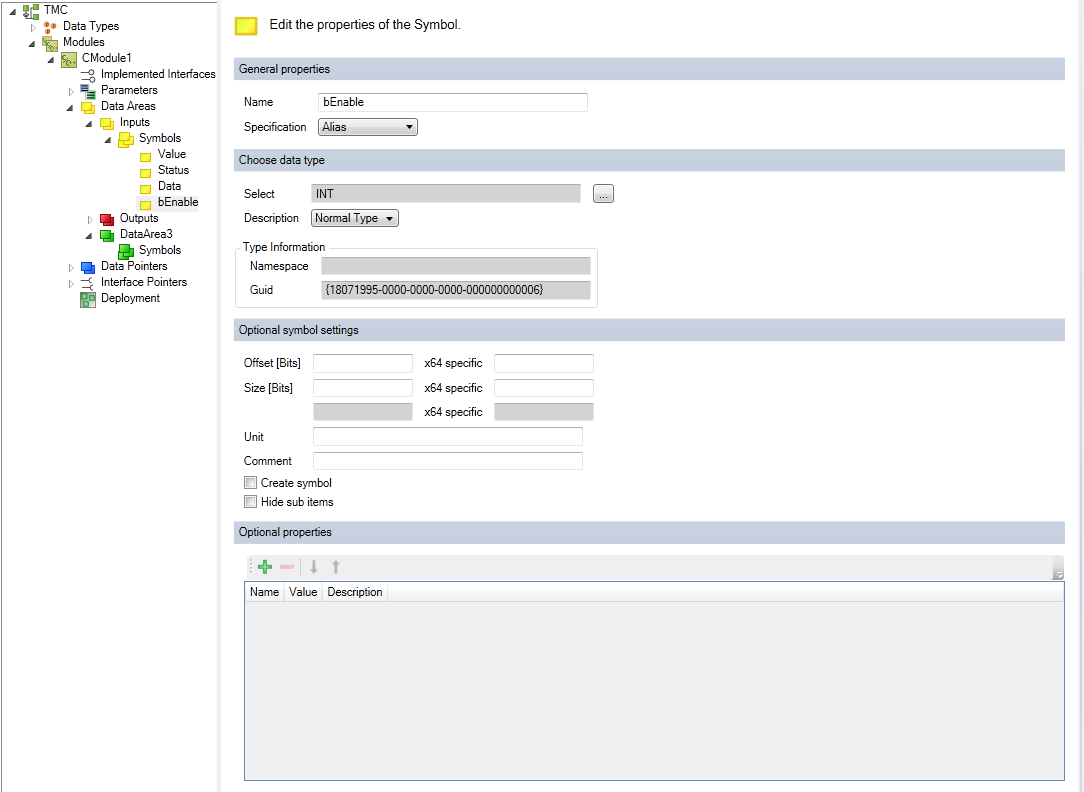
General properties
Name: Name of the symbol.
Specification: Data type of the symbol, see Data type properties.
Select data type
Select: Select data type – it can be a basic TwinCAT data type or a user-defined data type.
Description: Define whether the type is the following:
- Normal type
- Pointer
- Pointer to pointer
- Pointer to pointer to pointer
- a reference
Type information
- Namespace: Namespace for selected data type.
- GUID: unique ID of the data type.
Optional data type settings
Offset [Bits]: Offset of the symbol within the data area; a different offset can be defined for the x64 platform.
Size [Bits]: Size in bits, if specified. A different size can be defined for the x64 platform.
Comment: Optional comment that is visible, for example, in the instance configurator.
Create Symbol: Default setting for ADS icon creation.
Hide sub items: If a variable has sub-elements, then the System Manager will not allow the sub-elements to be accessed. This should be used, for example, in the case of larger arrays.