Weekly Time Scheduler Channel (continual days of the week)
The Weekly Time Scheduler Channel (continual days of the week) can be used for switching from one weekday until another.
Settings
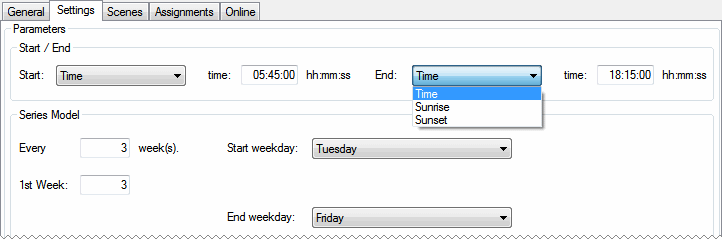
- Start: Time: Absolute start-time on a switching-day. The scheduler-channel will be active beginning with this time.
Start: Sunrise + Offset: The scheduler-channel will be active beginning with the actual sunrise + offset (in minutes) on a switching-day.
Start: Sunset + Offset: The scheduler-channel will be active beginning with the actual sunset + offset (in minutes) on a switching-day. - End: Time: Absolute start-time on a switching-day. The scheduler-channel will be active beginning with this time.
End: Sunrise + Offset: The scheduler-channel will be inactive beginning with the actual sunrise + offset (in minutes) on a switching-day.
End: Sunset + Offset: The scheduler-channel will be inactive beginning with the actual sunset + offset (in minutes) on a switching-day.
Series Model
- Every n weeks(s): The week (beginning from Monday) in which the PLC is initialised, is always a switching-week. From this week on all other switching-weeks are calculated by this periodicity.
- Monday...Sunday: Selectable switching-days.
Behavior
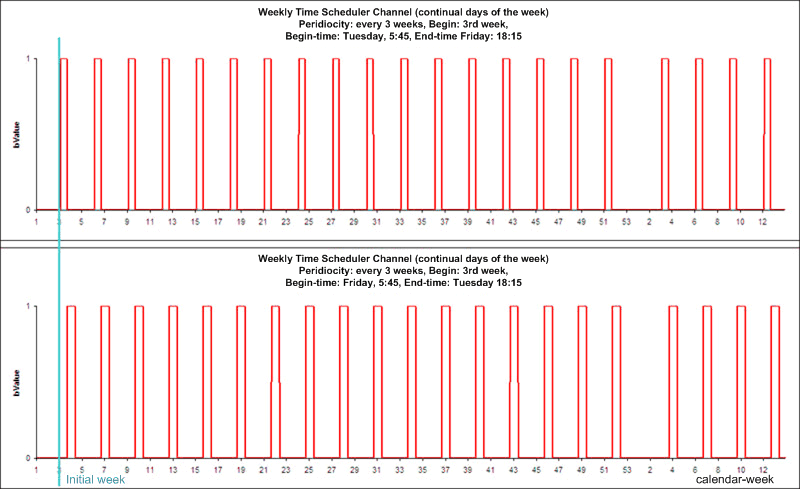
The periodicity is calculated from the beginning of the initial calendar-week (beginning with Monday, according to ISO 8601).
If the beginning-time is lower than the end-time (regarding the week), the time-channel will be activated and deactivated within one week. If the beginning-time is greater than the end-time the deactivation of the channel happens the week after activation. An equal beginning and end will result in a one-week activation of the channel.
It is also possible to use the sunrise/sunset function which will calculate both times for the switching-day together with an offset, which can be either positive or negative. These resulting start and end-time however are automatically delimited to the beginning (00:00:00:000) or the end of the day (23:59:59:999).
Scenes
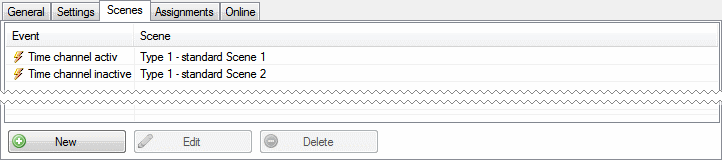
On this screen the scenes can be entered, which shall be executed, when the scheduler-channel turns to either its active or inactive state.
Online
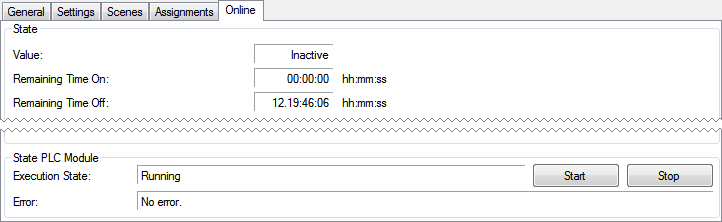
State
- Value: Displays the current state of the scheduler-channel.
- Remaining Time On: Remaining time in which the scheduler-channel is active.
- Remaining Time Off: Remaining time in which the scheduler-channel is inactive.
State PLC Module
- Execution State: Shows if the module is running or stopped.
- Error: In case of an error, the error code and the error parameter are displayed in this box.
- Start/Stop: Starts/stops the module.