Routing the cables in the mounting arm adapter
Notice | |
Cable damage due to incorrect cable routing Incorrect cable routing can cause cable damage when rotating and tilting the mounting arm adapter.
|
Depending on the device equipment, the connections are either located at the connection block on the rear side of the control panel or inside the mounting arm adapter. If you have ordered the control panel with one of the following Beckhoff mounting arm adapters installed ex factory, it is essential that you observe the cable routing shown (see Fig. 28) in order to avoid cable damage:
- C9900-M750
- C9900-M751
- C9900-M752
- C9900-M753
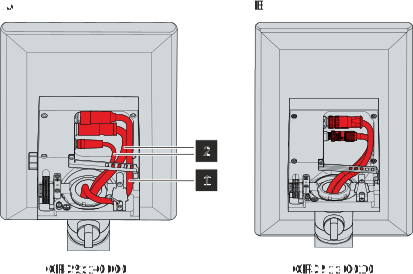 Fig.27: Routing the cables in the mounting arm adapter
For the CP39xx-0000 (section A) you have to route the power supply cable (1) further outside and the data cables (2) inside. You must fix the cables to the strain relief rail with cable ties as follows:
- Attach the power cable (1) to the far right of the strain relief rail by pulling the cable tie through the two outer right straps of the rail.
- Attach the data cables (2) to the far left of the strain relief rail, using a cable tie to secure both cables together. To do this, use the left and the third strap from the left.
For the CP39xx-0010 (section B) you have to route all cables inside. If you use the CU8803 transmitter box, you only have one cable, which you also have to lay inside. You must fix the cables to the strain relief rail with cable ties as follows:
- In the case of two cables use a cable tie to secure both cables together on the far left of the strain relief rail. To do this, use the left and the third strap from the left.
- In the case of one cable pull the cable tie through the two outer left straps on the far left of the strain relief rail.
When routing the cables for both device versions, follow the steps below:
- Loosen the Torx TX20 screw of the strain relief rail (section A).
- Rotate the strain relief rail by 180° to the left (section B).
- Route the signal and power supply cable inside the mounting arm adapter as shown in Figure 28.
- Route the data cables inside the mounting arm adapter as shown in figure before.
- Rotate the strain relief rail back over the cable (section C).
- Tighten the Torx TX20 screw again (section D).
- Fasten the cable to the strain relief rail with cable ties.
The figure shows the steps, taking the CP39xx-0000 as an example. The procedure is the same regardless of the product version.
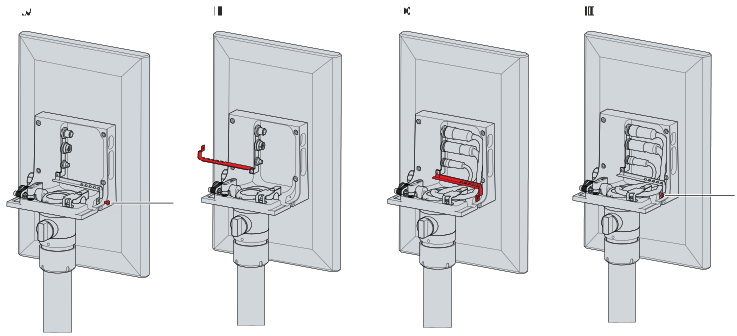 Fig.28: Cable routing procedure
In the case of the CP39xx-0000 you also have to fasten the power cable that lies further to the outside to a strain relief plate in addition to the strain relief rail (see Fig. 30). To do this, pull the cable through under the plate and then fasten the cable to the plate with cable ties.
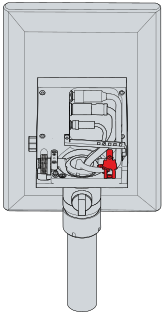 Fig.29: Power supply cable strain relief plate
The cables pass through the mounting arm tube into the connection compartment of the mounting arm adapter.