ModbusRtuMaster_KL6x5B
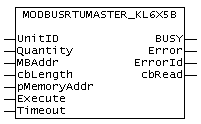
The function block ModbusRtuMaster_KL6x5B implements a Modbus master that communicates via a serial Bus Terminal KL6001, KL6011 or KL6021. The block is not called in its basic form, but individual actions of that block are used within a PLC program. Each Modbus function is implemented as an action.
An example program for a BC bus controller explains the operating principle.
Supported Modbus functions (actions)
- ModbusMaster.ReadCoils
Modbus function 1 = Read Coils
Reads binary outputs (coils) from a connected slave. The data is stored in compressed form (8 bit per byte) starting from address pMemoryAddr. - ModbusMaster.ReadInputStatus
Modbus function2 = Read Input Status
Reads binary inputs from a connected slave. The data is stored in compressed form (8 bit per byte) starting from address pMemoryAddr. - ModbusMaster.ReadRegs
Modbus function 3 = Read Holding Registers
Reads data from a connected slave. - ModbusMaster.ReadInputRegs
Modbus function 4 = Read Input Registers
Reads inputs registers from a connected slave. - ModbusMaster.WriteSingleCoil
Modbus function 5 = Write Single Coil
Sends a binary output (Coil) to a connected slave. The data is supposed to be stored in a compressed form (8 bit pro byte) starting from address pMemoryAddr. - ModbusMaster.WriteSingleRegister
Modbus function 6 = Write SingleRegister
Sends a single data word to a connected slave - ModbusMaster.WriteMultipleCoils
Modbus function 15 = Write Multiple Coils
Sends binary outputs (Coils) to a connected slave. The data is supposed to be stored in a compressed form (8 bit pro byte) starting from address pMemoryAddr. - ModbusMaster.WriteRegs
Modbus function 16 = Preset Multiple Registers
Sends data to a connected slave - ModbusMaster.Diagnostics
Modbus function 8 = Diagnostics
Sends a diagnostics request with a user defined subfunction code to a connected slave. The subfunction code is passed to the function by the MBAddr parameter. Additional data can be passed by pMemoryAddr.
VAR_INPUT
VAR_INPUT
    UnitID     : BYTE;
    Quantity    : WORD;
    MBAddr     : WORD;
    cbLength    : UINT;
    pMemoryAddr : DWORD;
    Execute     : BOOL;
    Timeout     : TIME;
END_VAR
UnitID: Modbus Station address (1..247). The Modbus slave will only answer if it receives telegrams containing its own station address. Optionally, collective addresses can be used for replying to any requests. Address 0 is reserved for broadcast telegrams and is therefore not a valid station address.
Quantity: Number of data words to be read or written for word-oriented Modbus functions. For bit-oriented Modbus functions, Quantity specifies the number of bits (inputs or coils).
MBAddr: Modbus data address, from which the data are read from the end device (slave). This address is transferred to the slave unchanged and interpreted as a data address.
MBAddr holds a subfuntion code when the Diagnostics function is used.
cbLength : Size of the data variable used for send or read actions in bytes. cbLength must be greater than or equal to the transferred data quantity as specified by Quantity. Example for word access: [cbLength >= Quantity * 2]. cbLength can be calculated via SIZEOF (Modbus data).
pMemoryAddr: Memory address in the PLC, calculated with ADR (Modbus data). For read actions, the read data are stored in the addressed variable. For send actions, the data are transferred from the addressed variable to the end device.
Execute : Start signal. The action is initiated via a rising edge at the Execute input.
Timeout : Timeout value for waiting for a response from the addressed slave.
VAR_OUTPUT
VAR_OUTPUT
    BUSY : BOOL;
    Error : BOOL;
    ErrorId : MODBUS_ERRORS;
    cbRead : UINT;
END_VARBusy: Indicates that the function block is active. Busy becomes TRUE with a rising edge at Execute and becomes FALSE again once the started action is completed. At any one time, only one action can be active.
Error: Indicates that an error occurred during execution of an action.
ErrorId: Indicates an error number in the event of disturbed or faulty communication.
cbRead: Provides the number of read data bytes for a read action
Hardware connection
The data structures required for the link with the communication port are included in the function block. The allocation in the TwinCAT System Manager on a PC is carried out according to the description in Chapter Serial Bus Terminal. On a BC bus controller, the I/O addresses have to be assigned manually. See Hardware assignment at the BC bus controller.
Requirements
|
Development environment |
Target system type |
PLC libraries to be linked |
|---|---|---|
|
TwinCAT from V2.8 |
PC (i386), CX1000 |
ModbusRTU.lb (Version 2.2 or higher) |
|
TwinCAT from V2.8 |
Bus controller BC |
ModbusRTU.lb6 (Version 2.2 or higher) |