Sample programs
 | Using the example programs This document contains sample applications of our products for certain areas of application. The application notices provided here are based on typical features of our products and only serve as samples. The notices contained in this document explicitly do not refer to specific applications. The customer is therefore responsible for assessing and deciding whether the product is suitable for a particular application. We accept no responsibility for the completeness and correctness of the source code contained in this document. We reserve the right to modify the content of this document at any time and accept no responsibility for errors and missing information. |
Diagnostics and time-stamping of analog input data
 Download (example file)
In this example the input data of an EL3702 will be checked for validity and processed:
- 1 ms cycle time, 10-fold oversampling, 2 channels
- WC, State, EtherCAT Master DevState and CycleCounter are checked cyclically; the input data is only passed on if it is valid
- Starting from the time stamp delivered with sample 0, all other samples will be given 64-bit DC time stamps
- Default values will be passed on if the input data is invalid; time stamping continues
- The data from each cycle is placed in a FIFO buffer so that a superordinated process, e.g. an evaluation, can take place.
Connection diagram:
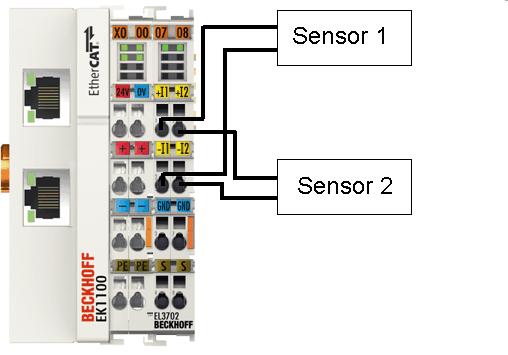 Fig.183: Connection for sample program
Starting the example program
The application samples have been tested with a test configuration and are described accordingly.
Certain deviations when setting up actual applications are possible.
The following hardware and software were used for the test configuration:
- TwinCAT master PC with Windows XP Professional SP 3, TwinCAT version 2.10 (Build 1330) and INTEL PRO/100 VE Ethernet adapter
- Beckhoff EK1100 EtherCAT coupler, EL3702 and EL9011 terminals
- 2 x optical proximity limit switch 0 - 10 V with two-wire technology
Procedure for starting the program
- After clicking the Download button, save the zip file locally on your hard disk, and unzip the *.TSM (configuration) and the *.PRO (PLC program) files into a temporary working folder.
- The *.pro file can be opened by double click or by the TwinCAT PLC Control application with menu selection “File/ Open”. The *.tsm file is provided for the TwinCAT System Manager (to review or overtake configurations).
- Connect the hardware in accordance with fig. Connection for sample program and connect the Ethernet adapter of your PC to the EtherCAT coupler (further information on this can be found in the corresponding coupler manuals)
- Select the local Ethernet adapter (with real-time driver, if applicable) under System configuration, I/O configuration, I/O devices, Device (EtherCAT); then on the “Adapter” tab choose “Search...”, select the appropriate adapter and confirm (see Fig. Searching the Ethernet adapter + Selection and confirmation of the Ethernet adapter).
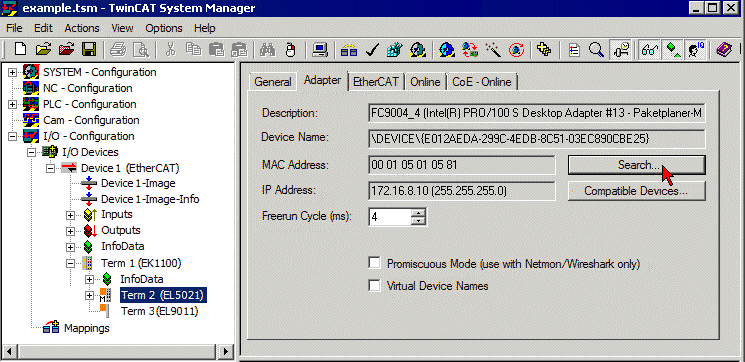 Fig.184: Searching the Ethernet adapter
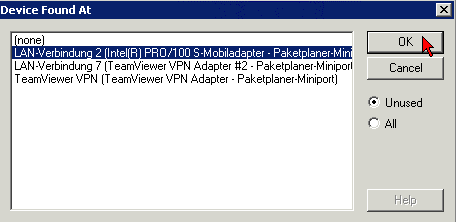 Fig.185: Selection and confirmation of the Ethernet adapter
- Activate and confirm the configuration (Fig. Activation of the configuration + Confirming the activation of the configuration)
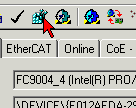 Fig.186: Activation of the configuration
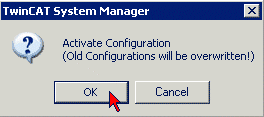 Fig.187: Confirming the activation of the configuration
- Confirm new variable mapping, restart in RUN mode (Fig. Generate variable mapping + Restarting TwinCAT in RUN mode)
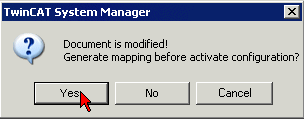 Fig.188: Generating variable mapping
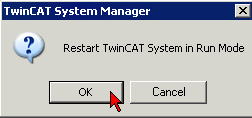 Fig.189: Restarting TwinCAT in RUN mode
- In TwinCAT PLC, under the “Project” menu, select “Rebuild all” to compile the project (Fig. Compile project)
- In TwinCAT PLC: log in with the “F11” button, confirm loading the program (Fig. Confirming program start), run the program with the “F5” button
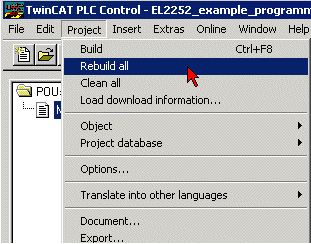 Fig.190: Compile project
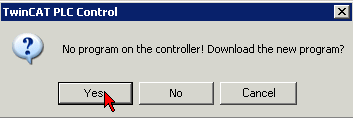 Fig.191: Confirming program start
Working with DC times in the controller
From the perspective of the controller the distributed clock time has the following characteristics:
- Unit 1 ns
- Universal zero point 1.1.2000 00:00, i.e. for variable evaluations an offset of 2000 years has to be added
- Scope up to 64 bit (sufficient for 584 years). However, some EtherCAT slaves only support a 32 bit scope, i.e. the register overflows locally after approx. 4.2 seconds and starts again at 0.
The following 3 data types are recommended for handling DC times
- T_DCTIME from TcEtherCAT.lib
This is based on T_ULARGE_INTEGER and is therefore unsigned. It can be used for linking with suitable hardware variables - T_ULARGE_INTEGER from TcUtilities.lib
Unsigned 64-bit data type - T_LARGE_INTEGER from TcUtilities.lib
Signed 64-bit data type, negative numbers are represented in two's complement notation (underflow below 0 --> 0xFFFF FFFF FFFF FFFF etc.)
TcUtilities.lib (section INT64) provides numerous relevant functions. Of particular significance are the cast functions LARGE_TO_ULARGE and vice versa.
This type should be used when working with time differences that may be negative.
If TwinCAT is used for external synchronization, negative times will inevitably occur in the offset values.
| 64- vs. 32-bit representation Some EtherCAT slaves can only handle 32 bit values for representing the DC time or handle it as a process data. In order to prevent problems caused by overflow (every 4.2 seconds), we strongly recommend using 64-bit times in the controller.
|
This sample project
 Download (example file) contains a function block that cyclically adds the high part to a 32-bit DC time to make 64 bits.