Standard Blind Drive
This module is used to control blind drives over two digital outputs.
Settings
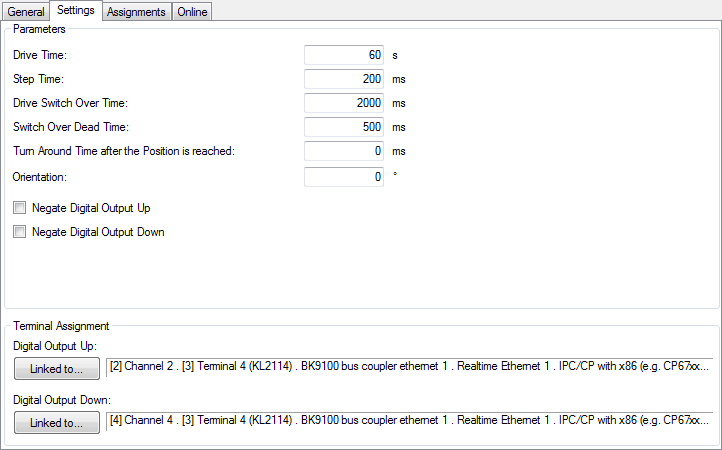
Parameters
- Drive Time: Total driving time of the blind.
- Step Time: Driving time for one step.
- Drive Switch Over Time: Time to turn the lamellas from one limiting position to the other (translucence from below / translucence from above).
- Switch Over Dead Time: Waiting time when the driving direction is changed.
- Turn Around Time after the Position is reached: If the blind is driven downwards to a specific position except 100% (completely closed) it may be necessary to turn the lamellas in order to prevent downward translucence (e.g., for bed or bathrooms). This time defines the turning of the lamellas.
- Orientation: Orientation of the blind. 0° = North, 90° = East, 180° = South, 270° = West.
- Negate Digital Output Up/Down: Inverts the control of the digital outputs.
Sensors / Actuators

In this menu you can enter a digital signal group (e.g. window contacts) that inhibits a blind moving down. In this way, automatic blind moving down in the case of open patio doors can be prevented.
Online
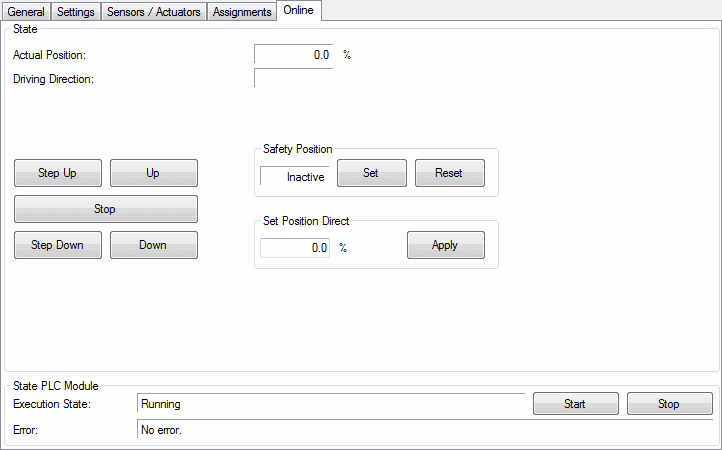
Commands
- Step Up/Step Down: Drives the blind for one step up/down. See parameter Step Time.
- Up/Down: Drives the blind up/down.
- Stop: Stops the blind.
- Safety Position Set: Driving into safety-position. For this purpose the blind drive will be moved up. No other commands except Safety Position Reset are accepted then.
- Safety Position Reset: Releases the lock of the safety-position.
- Set Position Direct: The blind drive will be driven to a specific position. 100% means completely closed, 0% completely opened.
State
- Actual Position: Actual position in %. 100% means completely closed, 0% completely opened.
- Driving Direction: The driving direction will show here, if the blind moves.
State PLC Module
- Execution State: Shows if the module is running or stopped.
- Error: In case of an error, the error code and the error parameter are displayed in this box.
- Start/Stop: Starts/stops the module.