Reading and writing of PLC variables
Requirements:
- Delphi 5.0 or higher;
- TwinCAT 2.9 or higher;
- The TcAdsDll.dll type library has to be imported (TcAdsDll_TLB.pas unit). Depending on the Delphi version, manual adjustments may be required in order to ensure error-free compilation.
This sample program demonstrates how the TcAdsDll COM interfaces can be addressed by Delphi for reading variables from the PLC or writing to the PLC.
In the FormCreate event function a connection to the server in the local system is established via CoTcClient.Create. The Connect method is then used to establish a connection to the first PLC runtime system (port 801) on the local computer (netid = '0.0.0.0.0.0').
The variables are read from the PLC by pressing the Read button and written to the PLC by pressing the Write button.
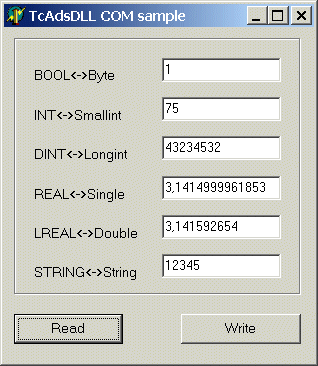
The Delphi program
unit Unit1;

interface

uses
  Windows, Messages, SysUtils, Classes, Graphics, Controls, Forms, Dialogs,
  ExtCtrls, StdCtrls, TcAdsDll_TLB, OleServer, ComObj;

type
  TForm1 = class(TForm)
    Edit1: TEdit;
    Edit2: TEdit;
    Edit3: TEdit;
    Edit4: TEdit;
    Edit5: TEdit;
    Edit6: TEdit;
    Label1: TLabel;
    Label2: TLabel;
    Label3: TLabel;
    Label4: TLabel;
    Label5: TLabel;
    Label6: TLabel;
    Bevel1: TBevel;
    Button1: TButton;
    Button2: TButton;
    procedure FormCreate(Sender: TObject);
    procedure Button1Click(Sender: TObject);
    procedure Button2Click(Sender: TObject);
  private
    { Private-Deklarationen }
    ads     : ITcAdsSync;
    client  : ITcClient;
    netId   : AmsNetId;
    cbRead  : integer;
    valBool : Byte;     // PLCBoolVar
    valInt  : Smallint; // PLCIntVar
    valDint : Longint;  // PLCDIntVar
    valReal : Single;   // PLCRealVar
    valLReal : Double;  // PLCLRealVar
    valString : AnsiString;// PLCStringVar
  public
    { Public-Deklarationen }
  end;
var
  Form1: TForm1;

implementation
{$R *.DFM}
/////////////////////////////////////////////////////////////////////////
procedure TForm1.FormCreate(Sender: TObject);
begin
    netId.b[0] := 0;  // 172
    netId.b[1] := 0;  // 16
    netId.b[2] := 0;  // 4
    netId.b[3] := 0;  // 23
    netId.b[4] := 0;  // 1
    netId.b[5] := 0;  // 1
    try
    client := CoTcClient.Create;
    try
        OleCheck(client.Connect( netid, 801, ads ));
    except
        ShowMessage('client.Connect() failed!');
    end;
    except
    ShowMessage('CoTcClient.Create() failed!');
    end;
end;
/////////////////////////////////////////////////////////////////////////
procedure TForm1.Button1Click(Sender: TObject);
begin
    SetLength( valString, 256);// make sure the string >= SIZEOF(PLCStringVar) variable
    try
    OleCheck(ads.Read($4020, 0, sizeof(valBool), cbRead, PByte(@valBool)^ ));
    OleCheck(ads.Read($4020, 2, sizeof(valInt), cbRead, PByte(@valInt)^ ));
    OleCheck(ads.Read($4020, 4, sizeof(valDint), cbRead, PByte(@valDint)^ ));
    OleCheck(ads.Read($4020, 8, sizeof(valReal), cbRead, PByte(@valReal)^ ));
    OleCheck(ads.Read($4020, 12, sizeof(valLReal), cbRead, PByte(@valLReal)^ ));
    OleCheck(ads.Read($4020, 100, Length(valString) + 1, cbRead, PByte(@valString[1])^ ));
    except
    ShowMessage('ads.Read(...) failed!');
    end;
    Edit1.Text := IntToStr( valBool );
    Edit2.Text := IntToStr( valInt );
    Edit3.Text := IntToStr( valDint );
    Edit4.Text := FloatToStr( valReal );
    Edit5.Text := FloatToStr( valLReal );
    Edit6.Text := String(valString);
end;
/////////////////////////////////////////////////////////////////////////
procedure TForm1.Button2Click(Sender: TObject);
begin
    valBool := StrToInt( Edit1.Text );
    valInt := StrToInt( Edit2.Text );
    valDint := StrToInt( Edit3.Text );
    valReal := StrToFloat( Edit4.Text );
    valLReal := StrToFloat( Edit5.Text );
    valString := AnsiString( Edit6.Text );
    if valString = '' then
    valString := #00;
    try
    OleCheck(ads.Write($4020, 0, sizeof(valBool), PByte(@valBool)^ ));
    OleCheck(ads.Write($4020, 2, sizeof(valInt), PByte(@valInt)^ ));
    OleCheck(ads.Write($4020, 4, sizeof(valDint), PByte(@valDint)^ ));
    OleCheck(ads.Write($4020, 8, sizeof(valReal), PByte(@valReal)^ ));
    OleCheck(ads.Write($4020, 12, sizeof(valLReal), PByte(@valLReal)^ ));
    OleCheck(ads.Write($4020, 100, Length(valString) + 1, PByte(@valString[1])^));
    except
    ShowMessage('ads.Write(...) failed!');
    end;
end;

initialization
    IsMultiThread := True;

end.
PLC program
PROGRAM MAIN
VAR
  PLCBoolVar AT %MX0.0 : BOOL := TRUE;
  PLCIntVar AT %MB2 : INT := 75;
  PLCDIntVar AT %MB4 : DINT := 43234532;
  PLCRealVar AT %MB8 : REAL := 3.1415;
  PLCLRealVar AT %MB12 : LREAL := 3.141592654;
  PLCStringVar AT %MB100: STRING := '12345';
END_VAR

;
Language / IDE | Unpack sample program |
|---|---|
Delphi XE2 | |
Delphi 5 or higher (classic) |