Changing the Interbus baud rate
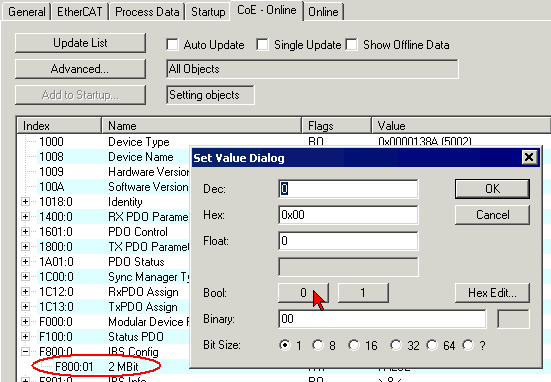
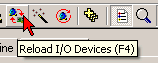
The CoE index 0xF800:01 enables the baud rate to be switched from 2 Mbit (default) to 500 kbaud. Then press the Reload button (Fig. Changing the Interbus baud rate + reloading the I/O devices).
- After double-clicking on index 0xF800:01 (Config mode, CoE tab) enter 0 (FALSE) in the SetValue dialog to switch to 500 kbaud.
- Then press the Reload button (Fig. Changing the Interbus baud rate + reloading the I/O devices).
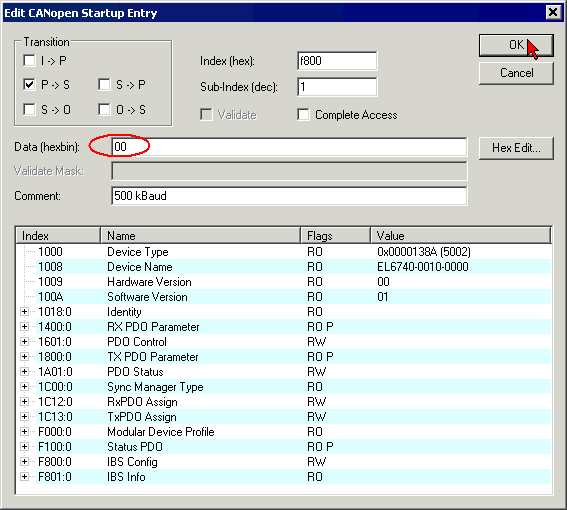
Alternatively, you can enter the baud rate in the startup list, so that the correct transfer rate setting is ensured when the I/O devices are loaded (Fig. Editing the startup entry for the transfer rate).
- On the "Startup" tab click "New..."
- After double-clicking on index 0xF800:01 in the "Edit CANopen entry" window enter "00" (for FALSE = 500 kbaud) in line "Data (bin)".
- Confirm with "OK" and press the "Reload" button.