Configuration TwinCAT 2.11 R3
The TwinCAT EtherNet/IP Slave enables EtherNet/IP Connectivity to the TwinCAT System.
Requirements:
- Win2000 / Windows XP: TwinCAT 2.11 R3
- If you use CE, the image must be also a TwinCAT 2.11 R3
- License Key for TwinCAT EtherNet/IP Slave Supplement product
- Intel PRO Network Interface Card (Ethernet Controller Intel 825X)
Installation
https://download.beckhoff.com/download/document/Application_Notes/DK9121-0111-0026.pdf
Download TwinCAT Supplement Installer for EtherNet/IP connectivity.
Operating System:
- Windows 2000 / XP/ Windows XP Embedded: TS6280 | TwinCAT EthernetIP Slave
- Windows CE: TS6280-0030 | TwinCAT EthernetIP Slave CE
Run the Installer on your programming PC and follow its instructions.
If the target operating system is Windows 2000 / Windows XP or Windows XP Embedded, the TwinCAT EtherNet/IP-Slave is now ready for Start-Up (go on with chapter "Start-Up"!).
If the target operating system is Windows CE, please follow the instructions below:
- The folder ..\TwinCAT\CE\TwinCAT EtherNetIP Slave CE\Install\ARM contains a Cabinet-File (CAB file) for ARM-based CE runtime systems (e.g. CX9001, CX9010, CP66xx,...).
The folder ..\TwinCAT\CE\TwinCAT EtherNetIP Slave CE\Install\X86 contains a Cabinet-File for X86-based CE runtime systems (e.g. CX1000, CX1020, CP77xx, CP62xx, CP72xx, C69xx,....) - Copy the file: TcEtherNetIP_S_Ce.XXXXX.CAB into a folder on the CE runtime system.
- On the CE system: Please install (double-click the CAB file) the CE components.
- IMPORTANT: Please suspend the CE device once after installation via "Start-> Suspend"!
Start-Up
General information
- At the moment, the TwinCAT EtherNet/IP Slave does only support static IP-Address configurations.
When the TwinCAT EtherNet/IP Slave configuration is beeing activated, the System is only going to start up
in RUN-Mode if the actual address settings match the stored configuration.
First Steps
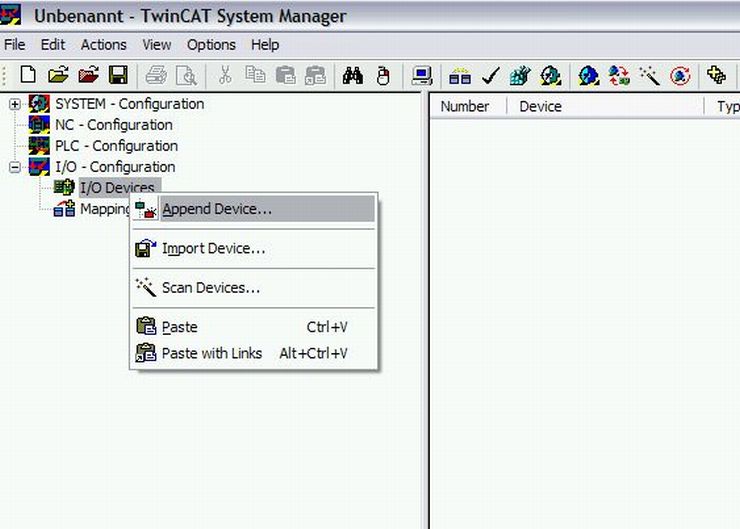
- Start the TwinCAT System Manager, create a new project and use the context menu after a mouse-click on "I/O Devices", to append a device in the I/O-Configuration
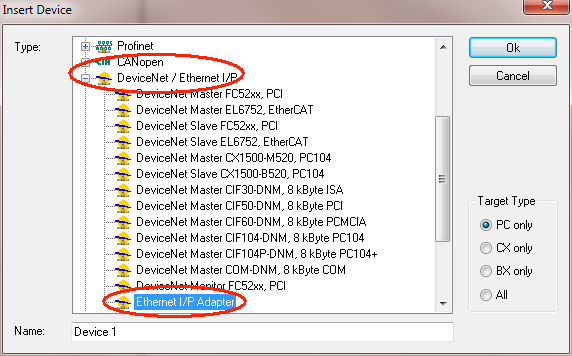
- Choose "DeviceNet/Ethernet/IP" as shown below
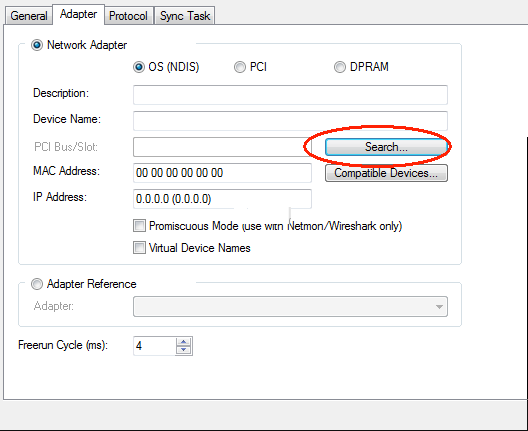
- Serach the Ethernet Interface, if you don't find a interface you havn't install the RT-Ethernet driver!
- Change to Sync Task, Create a new Task and change the Cycle Ticks to 10 ms.
Important: The Sync Tasks Cycle Time represents the lowest border of the EtherNet/IP cycle time (RPI)
(e.g. task cycle time = 10ms ==> EtherNet/IP RPImin=10ms)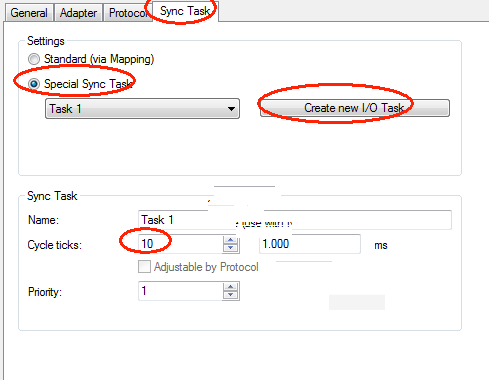
- It's necessary to define a sync master for triggering EtherNet/IP Slave Protocol.
- Option "Standard": the sync master must be defined manually by the user. (f. e. PLC Task) (this option is not supported by CX9000series)
- Option "Special Sync Task": a additional task will be created automatically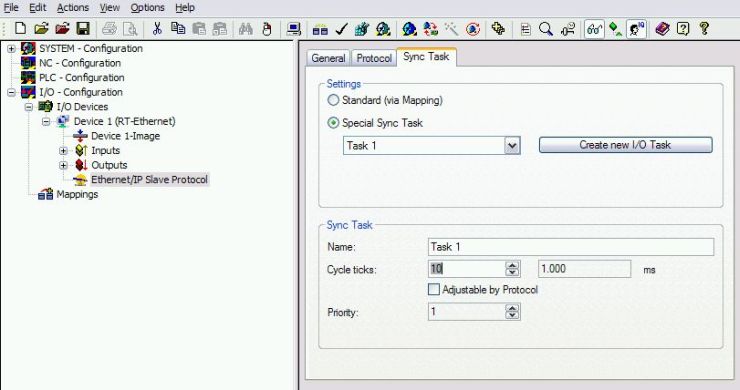
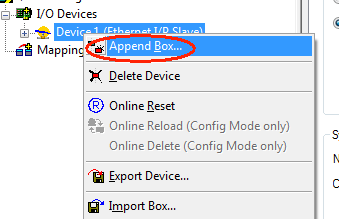
- Append an EtherNet/IP Slave Box as shown below
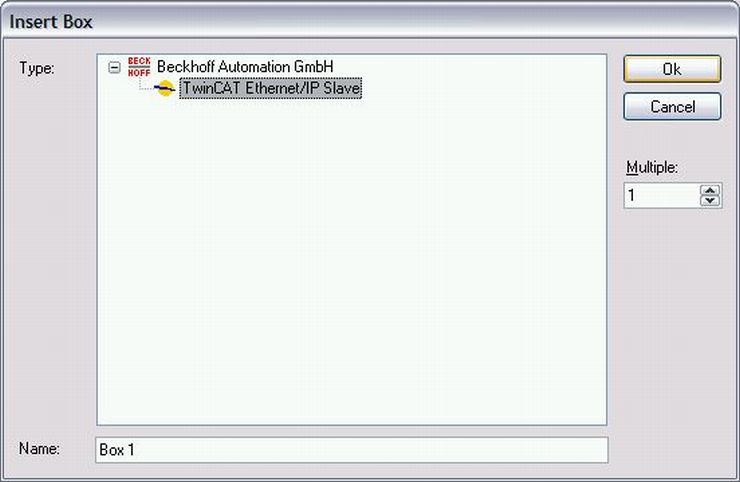
- Append a Connection (Assembly) on the EtherNet/IP Slave Box as shown below
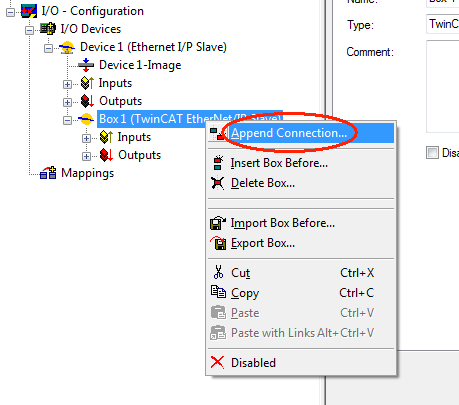
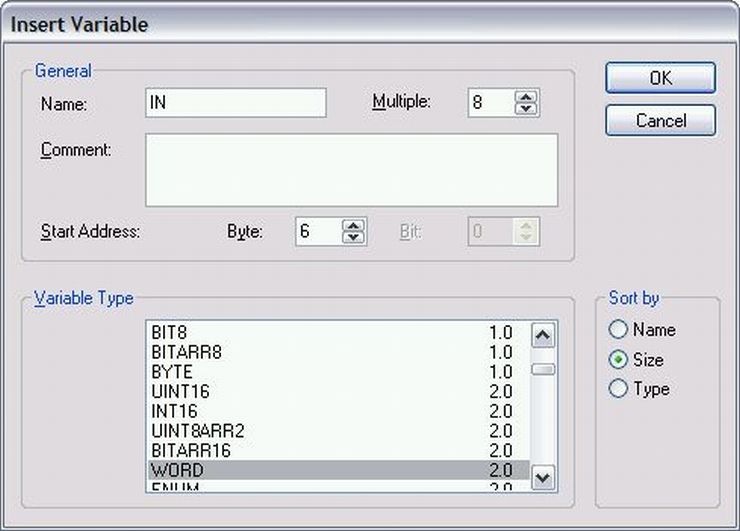
- Depending on application requirements it's possible to define the size of Processdata Image separately for inputs
and outputs from 1 up to 502 bytes. Please find an example for defining 8 Word Input Processdata as shown below.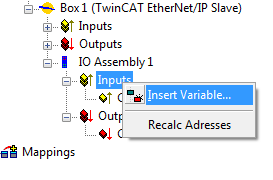
- A valid EtherNet/IP Configuration is shown below
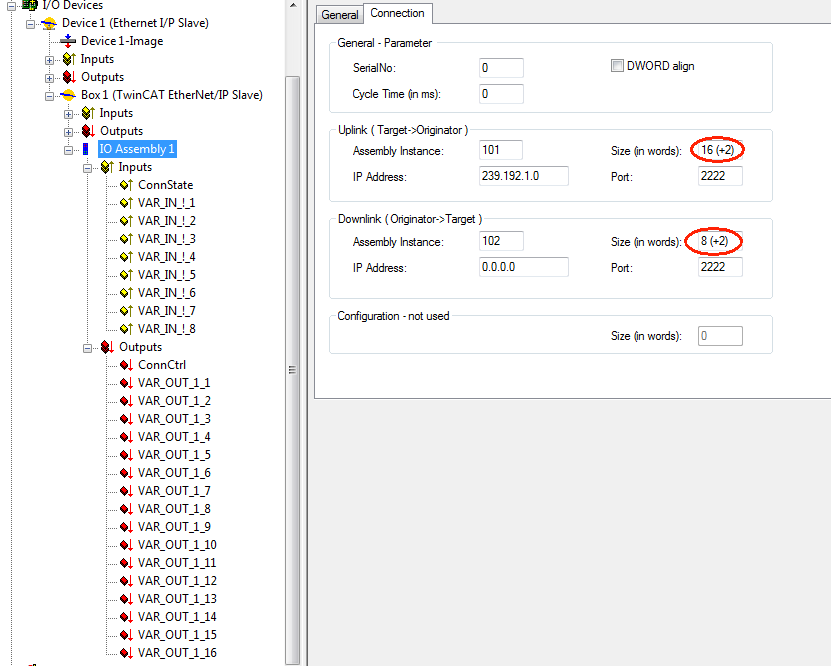
- The Pre-Configuration of TwinCAT EtherNet/IP Slave is finished now. Activate the configuration and go on with Integration in RSLogix5000.
Integration in RSLogix5000
- Open RSLogix 5000 and Create a new PLC project. When creating a new project make sure to select the correct controller type and
controller settings. This example uses a CompactLogix (L32E) with the TwinCAT EtherNet/IP Slave Example configured as shown above.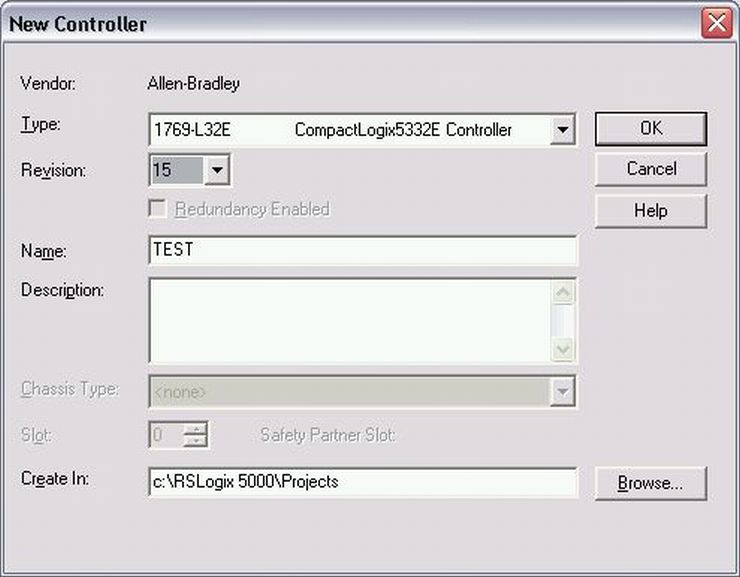
- Add a new module. When adding the TwinCAT EtherNet/IP Slave box, select the "ETHERNET-MODULE", since it is a generic Ethernet/IP
device, and it will be configured to work with the TwinCAT EtherNet/IP Slave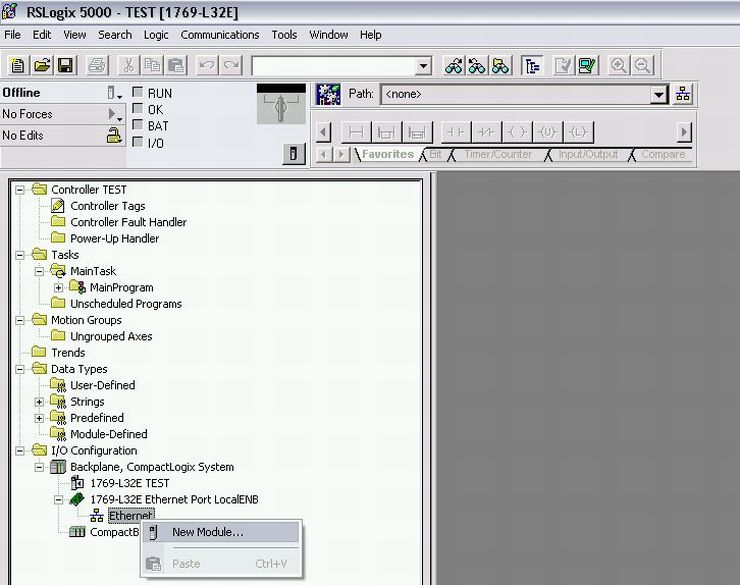
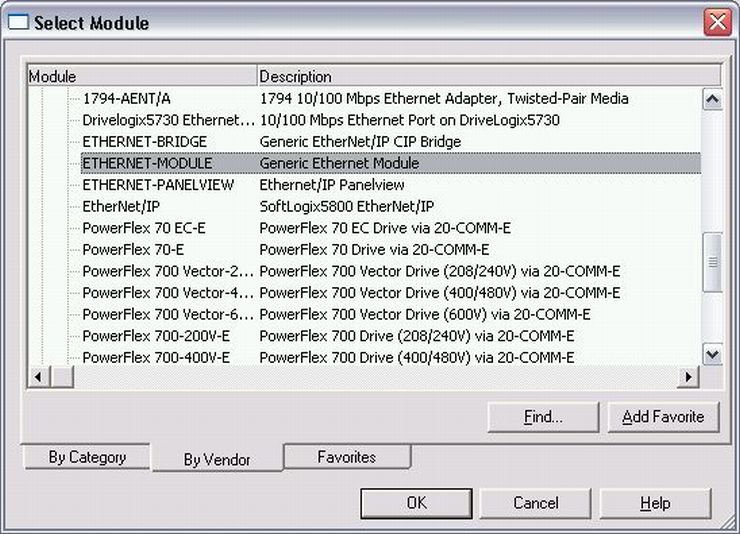
- Configuring the TwinCAT EtherNet/IP Slave in RSLogix:
- Enter IP-Address of TwinCAT EtherNet/IP Slave
- Choose Data Type (Comm Format)
- The Assembly Instances will be as follows:
- Input(Target->Originator: 101
- Output(Originator->Target: 102
- Configuration: 100
- Things to keep in mind when entering the data size for I/O:
- There will always be 4 bytes of input and 4 bytes of output data used for diagnostics.
- The EtherNet/IP Slave Dialog View in TwinCAT Systemmanager (Subchapter "First Steps", Picture 8) assist you to find the correct data sizes.
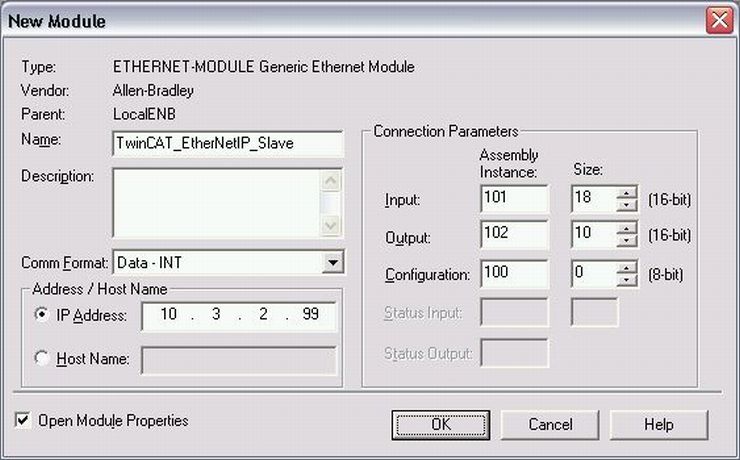
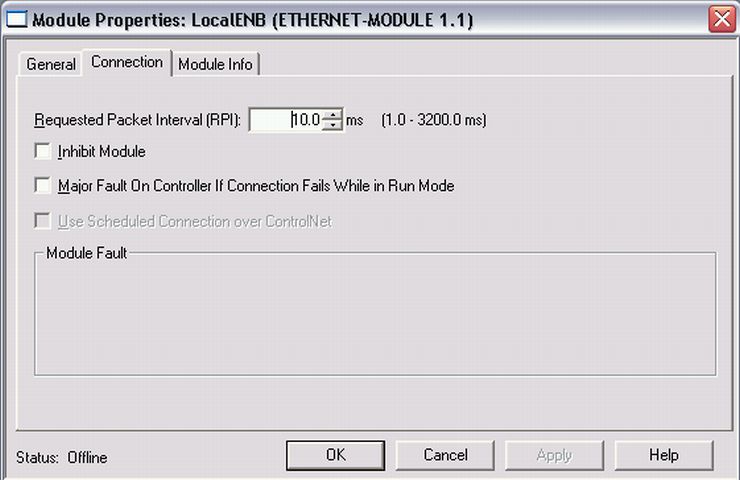
- Choose Requested Packet Interval in ms (shall not be lower than TwinCAT EtherNet/IP Slave Sync Task Cycle Time)
(Cycle Time in the TwinCAT Slave Example was set to 10ms)