Scaler

The Scaler module can be used to perform feature scaling.
Depending on the operation mode, the scaling parameters are used in different ways.
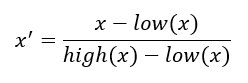
Normalization
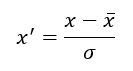
Standardization:
The scaling parameters can be configured directly. Alternatively, they can be imported from a file.
Optionally, a Boolean signal can be selected for the Enable Execution input so that the algorithm is only active if the value of the selected signal is TRUE.
Configuration options
- Scaling Mode: Mode for scaling.
Normalization: Result has a value range of 0..+1
Standardization: Result has a value range of -1..+1 - Scaling Param 1: The value of the first scaling parameter depends on the scaling mode set.
Normalization: Smallest value of the input signal
Standardization: Average value of the input signal - Scaling Param 2: The value of the second scaling parameter depends on the scaling mode set.
Normalization: Largest value of the input signal
Standardization: Standard deviation of the input signal - File Path (optional): File path to a file with previously determined parameters. The file is created by the Scaler Fitting module. File type: json.
Output values
- Result: Outputs the calculated value. This is calculated from the two scaling parameters depending on the scaling mode.
Normalization: Result has a value range of 0..+1
Standardization: Result has a value range of -1..+1