DIP switch
The BC9191 and BC9191-0100 feature an 8-position and a 2-position DIP switch. These DIP switches have different functions.
- 8-position DIP switch (red DIP switch)
- for setting the IP address
- for the configuration mode
- 2-position DIP switch (blue DIP switch)
- for the addressing mode
Setting the Ethernet IP address by DIP switch
The red 8-position DIP switch sets the address of the last byte of the IP address.
The factory-preset default IP address is set to 172.16.21.xxx, where xxx represents the DIP switch setting.
The last byte of the IP address is set with the 8-position DIP switch on the basis of the binary number system.
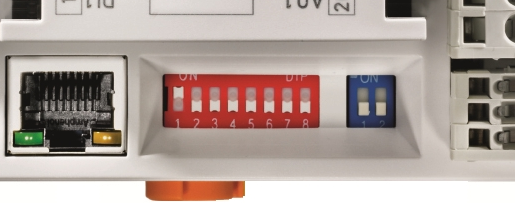
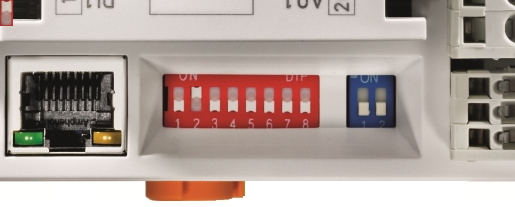
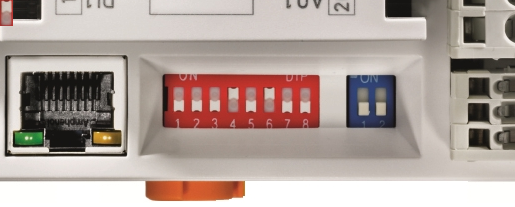
The IP address is applied by restarting the BC9191.
Addressing mode
Blue 2-position DIP switch
Left switch position: off, right switch position: on.
- DIP switches 1-2 select the IP address mode (blue DIP switch in the picture).
DIP1 | DIP2 | Meaning |
|---|---|---|
off | off | IP address 172.16.21.xxx (xxx corresponds to DIP switch 1-8), subnet mask 255.255.0.0, default gateway 0.0.0.0 |
on | off | BootP (DIP 1-8 all off), BootP & Safe (DIP 1-8 all on) |
off | on | DHCP |
on | on | Configuration via the TwinCAT System Manager |
Configuration mode, reset to factory settings
The following configurations can be made without configuration software using the DIP switch and the end terminal (KL9010).
This mode is active if only one end terminal (KL9010) is plugged on the BC9191. Otherwise, the normal settings apply.
- Switch off the BC9191, and plug in just the end terminal (KL9010).
- Set the DIP switches 1 to 8 to the desired function in the table.
The position of the blue dual DIP switch has no influence.
Requirements
Setting | Meaning / function | DIP1 | DIP2 | DIP3 | DIP4 | DIP5 | DIP6 | DIP7 | DIP8 |
|---|---|---|---|---|---|---|---|---|---|
255 | Restore factory settings | ON | ON | ON | ON | ON | ON | ON | ON |
254 | Delete boot project | OFF | ON | ON | ON | ON | ON | ON | ON |
253 | Delete TwinCAT Config | ON | OFF | ON | ON | ON | ON | ON | ON |
- Switch the BC9191 on again. Following the successfully executed function the Error LED lights up and the I/O RUN and I/O ERR LEDs flash alternately.
- After that you must switch the BC9191 off and remove the KL9010 again.
- Subsequently you can connect Bus Terminals again if necessary and proceed as usual.
The restore factory settings function also deletes the standard room automation program included in the delivery state of the BC9191.