Specifying the pulse width
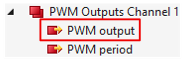
You can specify the duty cycle of the output signal via the process data value "PWM Outputs Channel n" > "PWM output". The pause duration is calculated automatically as the difference to the 100 % pulse duration.
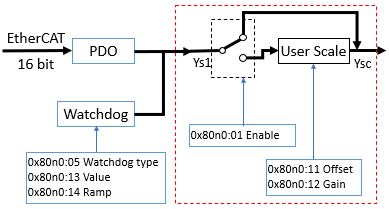
The value range of the pulse width is determined via the user scale in the CoE parameter 0x80n0:12 "Gain" and 0x80n0:11 "Offset".
- Value range without user scale in the factory setting (default)
User scale is not enabled in the factory setting ("Enable user scale" = FALSE). No further user scale settings (0x80n0:12 "Gain"/0x80n0:11 "Offset") are required.
Value range: 0 ... FFFFhex (65535dec) for 0 ... 100% duty cycle - Set the value range via the user scale (see block diagram)
- Enable user scale via index 0x80n0:01 "Enable user scale"
- Set the desired value range via 0x80n0:11 "Offset" and 0x80n0:12 "Gain".
With: | |||
Gain | = 0x80n0:12 User scale Gain |
| |
Offset | = 0x80n0:11 User scale Offset | ||
| |||
Is the influence of user scale: | |||
active: | Ysc = Ys1 * Gain*2-16 + Offset | ||
inactive: | Ysc = Ys1 | ||
- Specify pulse-pause ratio (duty cycle) via 0x70n0:11 "PWM output"
The following table shows examples for setting the duty cycle without user scale (factory setting) and with user scale.
Desired pulse-pause ratio | Specification of the pulse width via 0x70n0:11 "PWM output" | |||
|---|---|---|---|---|
Value range without user scale | Value range with user scale | |||
100% | FFFFhex | 65535dec | 2710hex | 10000dec |
75% | BFFEhex | 49150dec | 1D4Chex | 7500dec |
50% | 7FFFhex | 32767dec | 1388hex | 5000dec |
25% | 3FFFhex | 16383dec | 9C4hex | 2500dec |
10% | 1996hex | 6550dec | 3E8hex | 1000dec |
0% | 0000hex | 0dec | 0000hex | 0dec |