Addressing
Addressing and identification
At present three different methods are defined for the explicit identification of Hot Connect stations:
-
SecondSlaveAddress (SSA)
Here, the station address [0..65536] is permanently stored in the E²PROM of the EtherCAT slave. At the start the EtherCAT Slave Controller (ESC) loads this address into its register 0x0012, from where it can be read by the EtherCAT master.
This address is written - via the EtherCAT master/TwinCAT System Manager by the user during the system setup
- via a user interface on the slave (keyboard, display, selector switch, etc.) at device start-up
- In almost all cases they are used for unambiguous identification of a device, rather than as a flexible station.
In case of exchange the current address must be stored again in the replacement device.
A changed SSA will usually only be accepted by the ESC after a power restart of the device.
The SSA can be checked by the user by reading the register 0x0012 from the PLC (see TcEtherCAT-lib -> FB_EcPhysicalReadCmd) -
InputWord/IdentificationValue/Data Word
Here, a bit sequence corresponding to the station address [0...65535] is expected in the process data area of an EtherCAT slave and is interpreted by the master as the station address.
TwinCAT 2.10 expects the 16 bits data starting from register 0x1000. From TwinCAT 2.11R2 the information can be stored in any desired place in the slave; the EtherCAT master is informed of the storage location via the ESI description, called ADO (Address Offset) in the dialog (see Fig. Default setting of an EtherCAT slave that supports the DataWord identification mode).
The Input Word is usually displayed in the configuration as process data in the supporting slave (see EK1501, EK1101). -
Explicit Device Identification
On request by the master the slave informs the master of its ID [0 to 65535] via the AL status register 0x0134 during the start-up phase.
This method is supported from TwinCAT 2.11R3.
 | Addressing method In general the ESI file belonging to the EtherCAT device contains the information regarding which addressing methods the slave supports. This is displayed in TwinCAT System Manager -> EtherCAT Slave -> Advanced Settings and in general should not be changed by the user. |
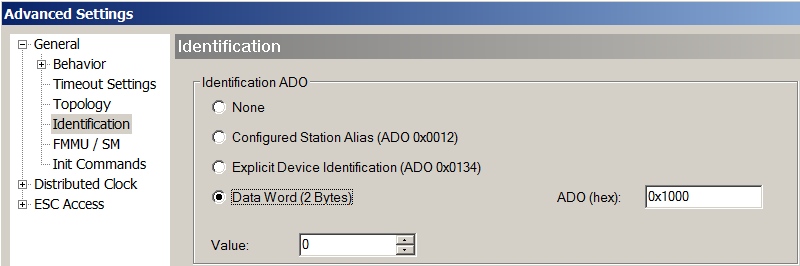 Fig.205: Default setting of an EtherCAT slave that supports the DataWord identification mode
All EtherCAT slaves are always initially addressed via the auto-increment procedure, after which the EtherCAT master attempts to find the configured station addresses in the field and assign them to the stations/couplers. To this end the outgoing port is opened and closed specifically for the purpose of determining the IDs.
Address allocation in the slave
Explicit Device Identification
The ID setting is to be carried out according to the device manual.
InputWord/IdentificationValue
As a rule, a selector switch accessible from the outside on such slaves allows the position to be set; the selection switch can be sealable or protected via a software mechanism. Other devices offer a user interface which allows ID setting.
Sample: Beckhoff EK1101 - free accessibility of the ID switch
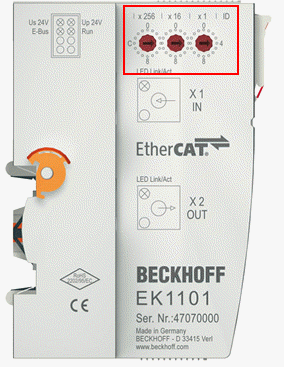 Fig.206: EK1101 with ID switch
SecondSlaveAddress
The SSA can be set by the master or via a user interface on the slave. The procedure for setting via the Beckhoff TwinCAT master is described below:
- Put the EtherCAT slave into operation in a simple configuration without addressing.
The slave should be in OP, WorkingCounter = 0, no LostFrames - Proceed via
Slave -> EtherCAT -> Advanced Settings -> E²PROM to the SecondAddress dialog. - The current address is displayed there; write the New Second Address in the slave E²PROM.
- The address is accepted after a power restart.
- In this example, the new address 10dec/0Ahex is set.
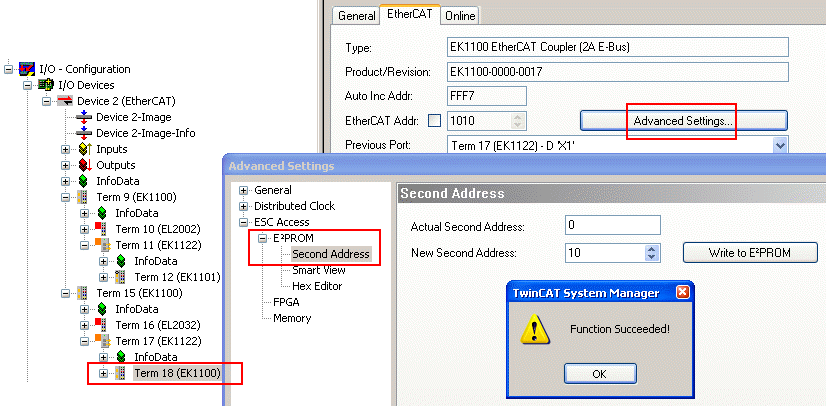 Fig.207: setting the SSA
You can check whether the slave has accepted the address as follows:
Proceed in the same dialog to Memory and check the contents of register 0x0012.
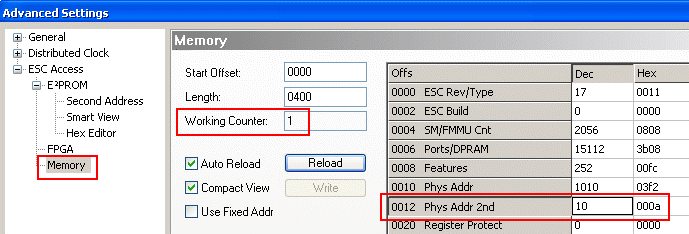 Fig.208: Checking the SSA
If nothing is displayed:
- Normally Wc = 0 is the “error-free” state; in this case WorkingCounter must be 1, otherwise there will be no communication with the slave for other reasons.
- Check whether you are on the right slave.
- As can be seen by Length = 400, the dialog reads 400hex bytes from the ESC in one operation. Most third party ESCs do not support this; in this case, no data will be displayed in the columns.
Try to find out from Length = 2, how many bytes your ESC supports.
Note about TwinCAT 2.11
The setting dialog for the SSA was slightly changed in TwinCAT 2.11, but retains the same properties.
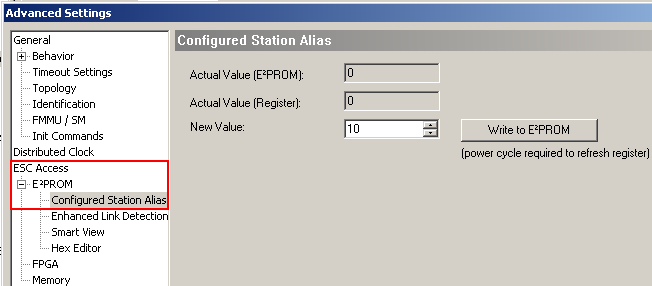 Fig.209: Setting SSA under TwinCAT 2.11
Compatible Beckhoff devices
In general, every EtherCAT slave can be assigned a Hot Connect address, regardless of whether it is an I/O terminal, a drive or a module of couplers and terminals.
| Hot Connect capability Check whether the EtherCAT slave you are using is Hot Connect-capable. Beckhoff slaves currently support the function as follows (as of June 2023): |
Version | SecondSlaveAdress | InputWord | Explicit Device Identification |
|---|---|---|---|
EK1100 | from HW18 | - | - |
EK1101, EK1501, EK1101-0080 | all | all | - |
BK1120 | from HW09 | - | - |
EL terminals | in general yes for most series from an XML version xxxx-xxxx-0016 | - | - |
EP box modules | in general yes for most series from an XML version xxxx-xxxx-0016 | - | - |
AX2xxx | - | - | - |
AX5xxx | all | see documentation | see documentation |