- KL336x - Oscilloscope Terminals
- Configuration software KS2000
- Masks for KL3362
- Process data for KL3362
Process data for KL3362
In the Process data tab, you can specify which data are displayed in the process image of the KL3362 oscilloscope terminal.
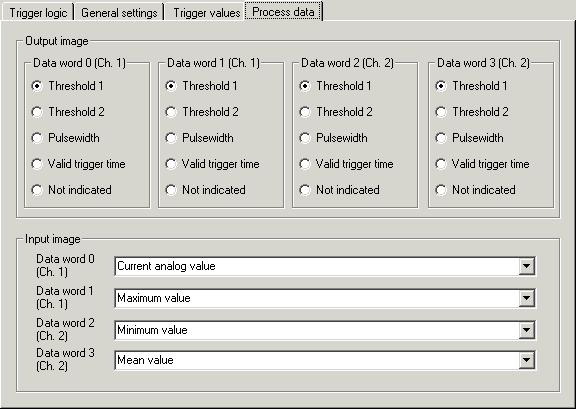
Output process image
- Data word 0
For trigger unit 1, select which trigger parameter you wish to specify with data word 0 (DataOUT0, channel 1) of the KL3362 (see Output process data in detail).
- Data word 1
For trigger unit 2, select which trigger parameter you wish to specify with data word 1 (DataOUT1, channel 1) of the KL3362 (see Output process data in detail).
- Data word 2
For trigger unit 3, select which trigger parameter you wish to specify with data word 2 (DataOUT0, channel 2) of the KL3362 (see Output process data in detail).
- Data word 3
For trigger unit 4, select which trigger parameter you wish to specify with data word 3 (DataOUT1, channel 2) of the KL3362 (see Output process data in detail).
Input process image
- Data word 0
Here you can specify which input value is transferred with data word 0 (DataIN0, channel 1) from the KL3362 to the controller (see Input process data in detail).
- Data word 1
Here you can specify which input value is transferred with data word 1 (DataIN1, channel 1) from the KL3362 to the controller (see Input process data in detail).
- Data word 2
Here you can specify which input value is transferred with data word 2 (DataIN0, channel 2) from the KL3362 to the controller (see Input process data in detail).
- Data word 3
Here you can specify which input value is transferred with data word 3 (DataIN1, channel 2) from the KL3362 to the controller (see Input process data in detail).