Creating a VisualObject
A VisualObject can be static or dynamic. A static VisualObject can be considered a simple graphic. A dynamic VisualObject is linked to a DataObject and thus represents a link between the HMI and the PLC.
When you select Add new VisualObject in the context menu of the HMI picture, a dialog opens: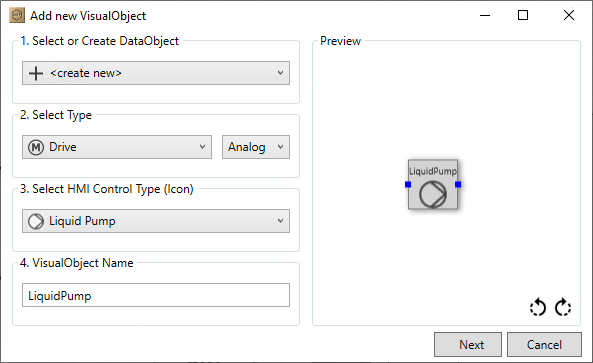
When creating a VisualObject, you can make the following settings in the Add new VisualObject dialog:
- Select or Create
DataObject - New
DataObject,that will be linked to theVisualObject. - Link to an existing
DataObject - No link to a
DataObject - Select
DataObjectType - When you create a new
DataObject, theSelect Typefield is displayed and you can select the type ofDataObjecthere. - Select
Icons - Depending on the selected
DataObject, an icon matching theDataObjectis preselected. You can customize the icon via the drop-down menu if necessary. VisualObjectName- If you have selected an existing
DataObject, the name will be taken fromDataObject. You can adjust this if necessary.
The VisualObject is displayed in the Preview area. There you also have the option of rotating the object in 90° increments using the arrows.
If you want to recreate the DataObject, click on Next. This opens the dialog for initializing the DataObject. The VisualObject is then created in the picture.