Create bootable USB stick
Before you can install TwinCAT/BSD on a Industrial PC, you must create a bootable USB stick and upload the current image to the USB stick. Use a flash tool such as Rufus to do this. You can then start Industrial PC from the USB stick and install TwinCAT/BSD.
Requirements for this step:
- Download the Rufus tool from https://rufus.ie/
Notice : Note that newer versions of Rufus may not be compatible with hard disk encryption tools. Rufus 3.13 is therefore recommended. - Bootable ISO file for TwinCAT/BSD installation
- USB stick with at least 2 GB storage space.
Proceed as follows:
- 1. Start the Rufus tool on a PC with Windows operating system.
- 2. Click Select and select the image you want to upload to the USB stick.
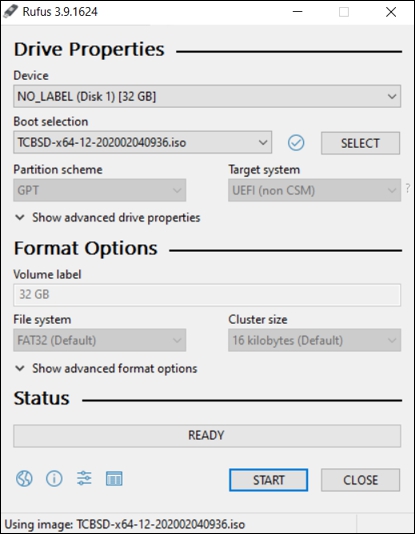
- 3. Under Device, select a USB stick as the target drive. If only one external drive is connected to your PC, the USB stick will be selected automatically.
Notice : Data on the USB stick is irrevocably deleted. - 4. Click Start to upload the image to the USB stick.
- The process may take a few minutes. Do not cancel the process until the Ready message appears. You have successfully created a bootable USB stick and can install TwinCAT/BSD on the Industrial PC in the next step.