OPC Configuration
For requirements see Installation Sequence.
Creating a configuration for the TwinCAT DriveCOM OPC Server
General the TwinCAT DriveCOm OPC Server requires a XML based configuration file which contains information about available 611U drives.
The TwinCAT DriveCOM Configurator allows to scan the currently activated TwinCAT system for Siemens 611U drives and to create the XML configuration file for the DriveCom OPC Server. The DriveCOM configurator also supports the OLE-interface which allows other applications to remotely handle the functionality DriveCom Configurator.
Requirements :
- FC310x Profibus Interface card and 611U drives are configurated in TwinCAT System Manager
- The System Manager configuration is activated
Quick start
Three steps to do in the DriveCOM configurator
- Start the TwinCAT DriveCom Configurator
- Select
 "ScanCurrentConfig". The configurator will scan the current activated TwinCAT system configuration "Currentconfig.xml" file for 611U drives and will display the results.
 - Select
 "Save As.." to save the scan-result in an TwinCAT DriveCOM-OPC-XML configuration file. The configurator will ask if this new created xml-file should be activated for the TwinCAT DriveCOM OPC Server.
The new OPC DriveCOM configuration gets valid with the next TwinCAT DriveCOM-OPC-Server start.
If different TwinCAT DriveCOM XML configuration files are existing a specific file can be activated with a click on  "Activate".
The TreeView :
Use the tree view to select Devices or Axes. When selected, you can check and edit the items properties (Displayed in the right pane).
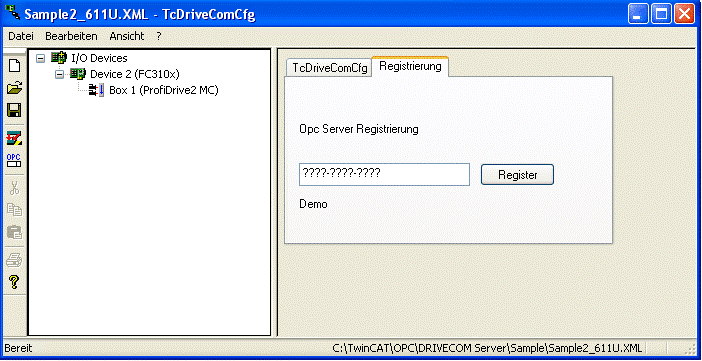
When selecting the root item ("I/O Devices"), you can choose to register the DriveCom Product.
The Right Pane :
Use the Right Pane to view or edit Item Properties or register the DriveCom product.
The Toolbar :
| New File. Closes the current Document and creates a new one |
| Import. Opens an Existing OPC Server configuration. |
| Export. Creates an OPC Server configuration file. |
| ScanCurrentConfig. Scans the current TwinCat Configuration. |
| Activate. Choose an existing OPC Configuration and activate it. |

