Features CoE
Notice | ||
 | Parameterization via the CoE list (CAN over EtherCAT) The EtherCAT device is parameterized via the CoE - Online tab (with a double click on the respective object) or via the Process Data tab (assignment of PDOs). A detailed description can be found in the EtherCAT System-Documentation in chapter “EtherCAT subscriber configuration” Please note the general CoE notes in the EtherCAT System Documentation in chapter “CoE-interface” when using/manipulating the CoE parameters: | |
Depending on the main PDO/optional PDOs further settings can be selected in the CoE (CAN over EtherCAT list).
The following CoE settings from objects 0x8000 and 0x8001 are possible and are shown below in their default settings:
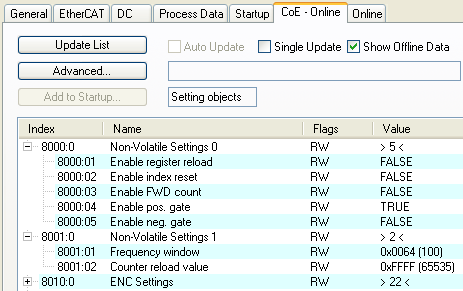 Fig.160: “CoE-Online” tab
The parameters are described on page object description and parameterization.
Register Reload
If Register Reload is enabled in CoE object 0x8000:01, the counter value is set
Index Reset
If Index Reset is enabled in CoE object 0x8000:02, input C resets the counter to 0.
 | “Register Reload” and “Index Reset” “Register Reload” and “Index Reset” cannot be operated simultaneously. |
Forward/backward counter “Enable FWD count”
If “Enable FWD Count” is activated in CoE object 0x8000:03, the EL5101 operates as counter on channel A. Channel B indicates the counting direction: B=TRUE forward, B=FALSE backward.
The counter can be locked via the gate input (24 V).
Frequency
- The timeframe for the frequency calculation is set to 10 ms (see Fig. “Process data” tab); in addition a variably configurable measuring window is available (parameterization via object 0x8001:01 , output frequency value in object 0x6000:06)
- Only the increment edges in the specified time window are counted.
- If no edge change occurs for approx. 1.6 s, any frequency specification is cancelled.
- This calculation is carried out in the slave without reference to the distributed clocks system. It is therefore independent of the DC mode.
- No frequency measurement is possible if the counter is blocked by the gate. In this case the period can be measured regardless.
- If an encoder signal is only present at input A/A and the frequency/period is to be measured, the terminal must be set to “Enable FWD count” in CoE 0x8000:03.
- A C or external reset restarts the frequency measurement. The last frequency value remains unchanged until a new frequency value is determined.
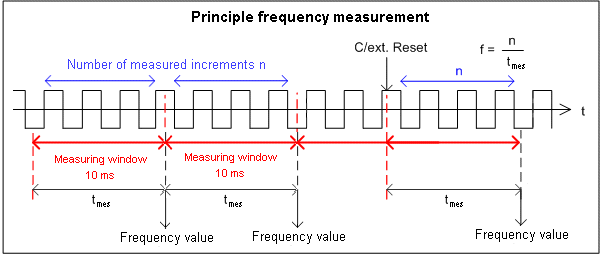 Fig.161: Frequency measurement principle in normal operation mode
Period calculation
- This calculation is carried out in the slave without reference to the distributed clocks system. It is therefore independent of the DC mode.
- In each cycle the interval between two positive edges of input A is counted with a resolution of 100 ns.
- If no edge change occurs for approx. 1.6 s, any period specification is cancelled.
| Frequency and period measurement From the explanatory notes above it is apparent that the frequency measurement can measure the current axis status (velocity) significantly more accurately than the period measurement. Frequency measurement is therefore preferable, if possible. |