Reloading an EtherCAT device
During a reload a reset is performed, the process data structure is reconfigured, the start procedures for all slaves are rearranged based on the current configuration, and the hardware tree associated with the device is started, either in Run or Config (FreeRun) mode as required.
An EtherCAT device (i.e. the EtherCAT strand) can be reloaded in several ways:
- TwinCAT restart in run mode
Effect: all devices in the configuration are restarted (EtherCAT master, Profibus master, Ethernet interfaces, ...) - TwinCAT restart in config mode
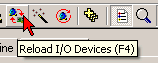
Effect: all devices in the configuration are restarted (EtherCAT master, Profibus master, Ethernet interfaces, ...) - Reload of all configured devices via icon or F4 shortcut
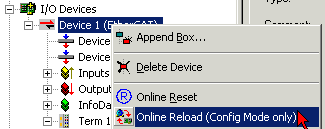
Effect: all devices in the configuration are restarted (EtherCAT master, Profibus master, Ethernet interfaces, ...) - Selective reload of individual devices through right-click on the device in the System Manager;
Effect: only the selected device is restarted