EPI3xxx, ERI3xxx | IO-Link box modules with analog inputs · 0 次阅读
Open the IO link configuration tool
Requirement: an IO-Link master has been added in the Solution Explorer under the "I/O" entry.
1. Double-click on the IO-Link master.
A device editor for the IO-Link master opens.
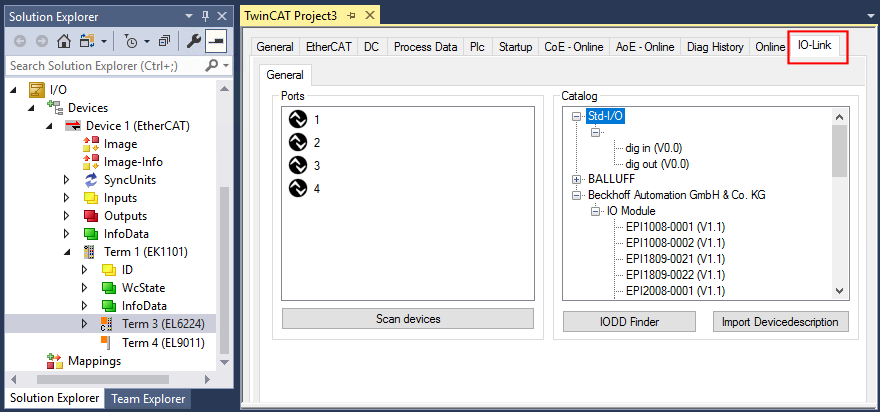
2. Click on the "IO-Link" tab.
The IO-Link configuration tool opens. The configuration tool contains two fields:
„Ports“ The left-hand field "Ports" shows a list of the ports of the IO-Link master. If a device has been assigned to a port, the device designation is shown next to the port.
„Catalog“ The right-hand field "Catalog" shows the device catalog. The device catalog contains an alphabetically sorted list of the IO-Link devices for which a device description (IODD) exists in the local TwinCAT installation. The IODDs for the EPIxxxx, ERIxxxx IO-Link Box modules from Beckhoff can be downloaded via the Download finder. The downloaded zip file contains the IODD device description files for the Beckhoff EPIxxxx, ERIxxxx IO-Link Box modules.