Configuration for multiple edges per PLC cycle
The process data is only transferred once per PLC cycle. If, for example, several positive signal edges occur within a PLC cycle, the timestamp is only saved for one of these edges.
You can set which timestamp is to be saved:
- The timestamp of the first detected signal edge in the PLC cycle, positive or negative in each case
- The timestamp of the last detected signal edge in the PLC cycle, positive or negative in each case
Proceed as follows:
- 1. Click on the box in the Solution Explorer.
- 2. Select the "EtherCAT" tab.
- 3. Click the "Advanced Settings..." button.
- 4. Navigate to the entry "Distributed Clocks" > "Latch".
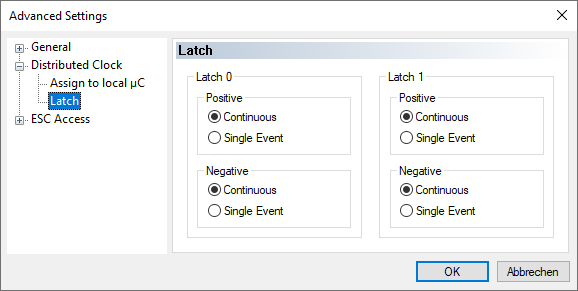
- 5. Select "Continuous" to save the timestamp of the last edge in the PLC cycle.
Select "Single Event" to save the timestamp of the first edge in the PLC cycle. - 6. Activate the TwinCAT configuration to apply the setting.
