Channel Settings
To configure channel settings open the channel style window. The active channel is selectable in the drop-down field on the top.
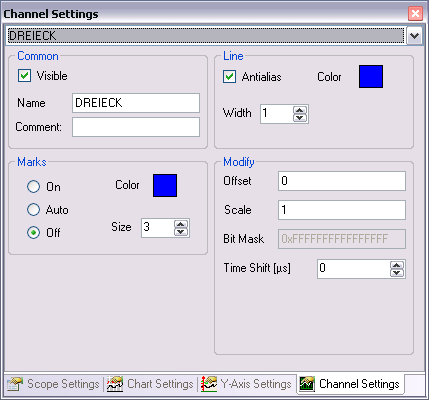
Common
- Visible: Show / hide the graph.
- Name: The name field changes the label name of the channel. Using the right mouse to open a context menu providing the symbolname or parts of it to set as new name.
- Comment: Enter a free comment string here. A comment in the connected ADS-symbol is inserted automatically.
Line
- Antialias: The antialias property determines if the graph is drawn "nice" (antialias) or "fast".
- Color: The graph color.
- Width: The line width of the graph in pixel.
Marks
- On: Enables the data point highlighting.
- Auto: Enables the data point highlighting denpending on the current zoom.
- On: Disables the data point highlighting.
- Size: Size of the marks.
- Color: The mark color.
Modify
- Offset: An offset may be set to a channel to arrange more comfortable it in the chart.
- Bit Mask: The bit mask is used to clip single bits out of the channel-value. The displayed value is the result of a binary AND operation between the channel value and the mask. Floating point values aren’t changed by any mask. This option may be useful to watch single bits of status bytes.
- Scale: By setting a scale factor unequal to 1 the displayed values of the channel can be scaled. This may be useful for example to show angle values, recorded in RAD, in a more readable scale like DEG. With Scale = 360/(2*Pi) = 57.296.
- Time Shift: The time shift option is an offset on the timeline. It may be useful to compare channels with a known bus deadtime.