State diagram valid for V3.1.10
The state diagram describes the state of an axis group. The states described here can be read from the PLC using the function block MC_GroupReadStatus.
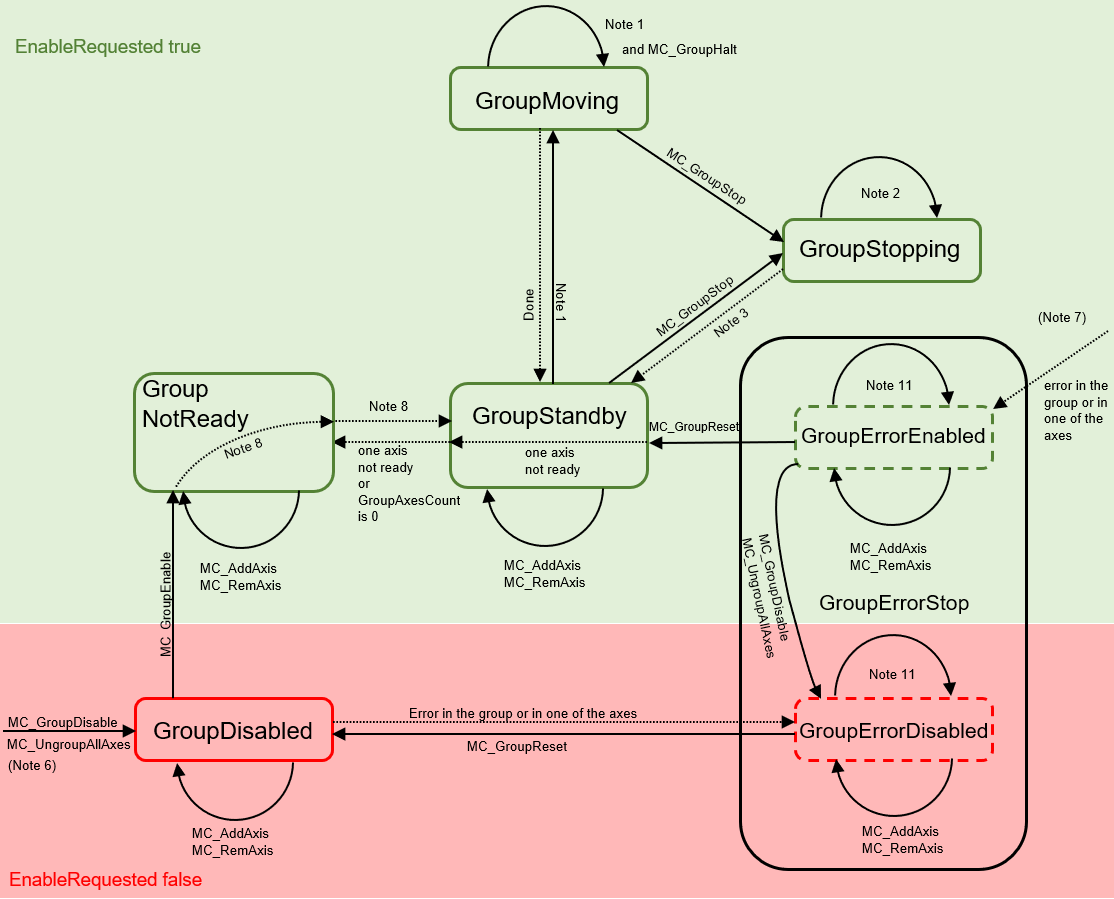

Note | Description |
1 | Applicable for all non-administrative (movement) function blocks. |
2 | In the GroupStopping state all function blocks can be called but they are not executed, with the exception of MC_GroupDisable, which cancels the stop and creates the transition to GroupDisabled. |
3 | MC_GroupStop.DONE AND NOT MC_GroupStop.EXECUTE |
4 | - |
5 | - |
6 | MC_GroupDisable can be output in all states and changes the state to GroupDisabled. If they are output in an error state, the state changes to GroupErrorDisabled. |
7 | From any state with EnableRequested TRUE. |
8 | If "bIsControlLoopClosed" is TRUE for all axes and the group is not empty. "bPositiveDirection"/"bNegativeDirection" do not have be enabled. |
9 | "bIsControlLoopClosed" and the two flags "bPositiveDirection"/ "bNegativeDirection" must be set to TRUE. |
10 | - |
11 | In the error states all administrative function blocks are permitted with the exception of MC_GroupEnable. However, in the error states you can only create state transitions, e.g. to GroupErrorDisabled for MC_GroupDisable or MC_UngroupAllAxes and MC_RemoveAxisFromGroup, when the last axis is removed. |
 | In the GroupMoving state stationary axes may be added to and removed from a CA group. If an attempt is made to add a moving axis to a group or remove it from the group, the command is rejected with an error (the group change with a moving axis is also rejected). |
| MC_GroupReset has no effect if the state is different from GroupErrorStop. |