Settings
The dialog mask for the parameterization of the KL2751/KL2761 can be found under Settings.
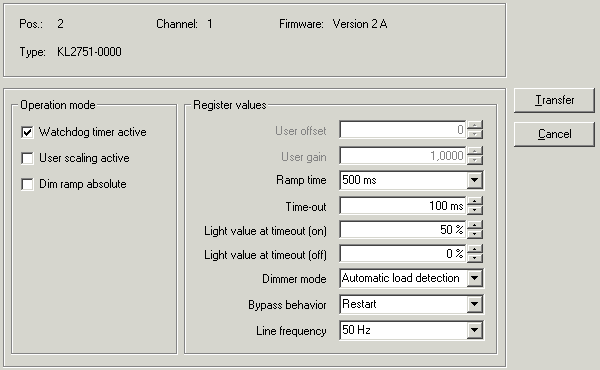 Fig.22: Settings via KS2000
Operating mode
- Watchdog timer active (R32.2)
Here you can deactivate the watchdog (default: active).
- Watchdog timer active (R32.2)
Here you can activate user scaling (default: inactive).
- Dimming ramp absolute (R32.3)
Here you can switch the dimming ramp from relative (default) to absolute.
 | Absolute dimming ramp The use of the absolute dimming ramp is useful, for example, when you want to control two lamps with two dimmer terminals synchronously. |
Register values
- User offset (R33)
You can specify the offset for the user-scaling here (default: 0).
- User gain (R34)
Here you can specify the user scaling gain (default: 1).
- Ramp time (R35)
You can select the ramp time here (default 500 ms).
Permissible values: 50 ms, 100 ms, 200 ms, 500 ms, 1 s, 2 s, 5 s and 10 s
- Timeout (R36)
Here you can specify the timeout time for detecting a fieldbus error (default: 100 ms).
- Light value for timeout (on) (R37)
Here you can specify the light value for a timeout at which the load was switched on when it occurred (default: 50 %).
- Light value for timeout (off) (R38)
Here you can specify the light value for a timeout at which the load was switched off when it occurred (default: 0 %).
- Dimmer mode (R39)
Here you can specify the dimmer mode: - Automatic recognition*: The dimmer terminal automatically detects the type of load (capacitive/resistive or inductive) and switches to trailing edge phase control or leading edge phase control (default).
- Trailing edge control: typically used for capacitive loads (e.g. electronic ballasts) or ohmic loads (e.g. bulbs)
- Leading edge control: typically used for inductive loads (e.g. transformers, conventional ballasts)
- Rectifier, positive: only the positive half-wave is switched through to the load with leading edge phase control
Do not use this operation mode
- with firmware version 2E of the KL2751 or
- with firmware version 1E of the KL2761!
Instead, use the operation mode Rectifier mode, negative with these firmware versions! - Rectifier, negative: only the negative half-wave is switched through to the load with leading edge phase control
- Zero switch (only KL2751/KL2761 from firmware version 4E)
| *) Automatic recognition and long cable lengths Manual preselection of the operation mode is recommended in the case of long cables between the dimmer terminal and the load. |
- Behavior after short circuit (R40)
Here you can define the behavior of the dimmer terminal following a short circuit on the load output.
The dimmer terminal is equipped with short-circuit current limitation. The current is limited to approx. 10 A to 15 A. Normally triggering of the fuse is therefore prevented. The short circuit current flows for less than 0.5 ms and is switched on automatically. - Remains switched off:
The user has to switch the system on again after a short circuit. - Switch on again (default):
Following the detection of a short circuit, the dimmer terminal attempts to resume operation and tests the line with a low voltage. If the short circuit has been eliminated, the dimmer terminal returns to the previous dimmer value.
- Mains frequency (R41)
Here you can set the dimmer terminal to your mains frequency, default: 50 Hz