Commissioning instructions
EtherCAT cycle time
If the EL500x is operated faster than the time required for SSI communication and processing, the start of the next SSI communication is no longer synchronous with the EtherCAT bus cycle and the local DC signal, but is delayed until the next free signal or until processing is completed.
The minimum meaningful cycle time depends on the firmware version. Typical data can be found in the following table, although they may have to be verified for specific applications depending on the frame length and inhibit time.
Model | Typical minimum recommended cycle time |
|---|---|
EL5001 up to FW10 | 400 µs |
EL5002, EL5001 from FW11 | 200 µs |
TxPDOToggle from the extended status word can be used to determine the actual update frequency in the application.
Commissioning
Default setting: 25 bit, Gray coding, 500 kbaud, no PowerFail bit.
On commissioning the following parameters must be set:
• Settings according to CoE
• DC mode
• Process data
CoE settings
The terminal is parameterized via the CoE – Online tab (double-click on the respective object) or via the Process Data tab (assignment of PDOs).
Depending on the firmware version/terminal type the EL500x settings must be implemented in CoE range 0x4066 and following or range 0x8010.
- EL5001 up to FW10 only have indices 0x4060ff and must be parameterized here.
- EL5001 from FW11 and EL5002 have index 0x8010 (0x8000 / 0x8010), which should be used for this purpose. Range 0x4060ff can continue to be used. Modifications in one section are automatically copied into the corresponding other section.
 | EtherCAT XML Device Description The display matches that of the CoE objects from the EtherCAT ESI Device Description (XML).We recommend downloading the latest XML file from the download area of the Beckhoff website and installing it according to installation instructions. |
| Parameterization via the CoE list (CAN over EtherCAT) The EtherCAT device is parameterized via the CoE-Online tab (double-click on the respective object) or via the Process Data tab (allocation of PDOs). Please note the following general CoE notes when using/manipulating the CoE parameters:
|
In TwinCAT 2.11 the online CoE list is structured as follows:
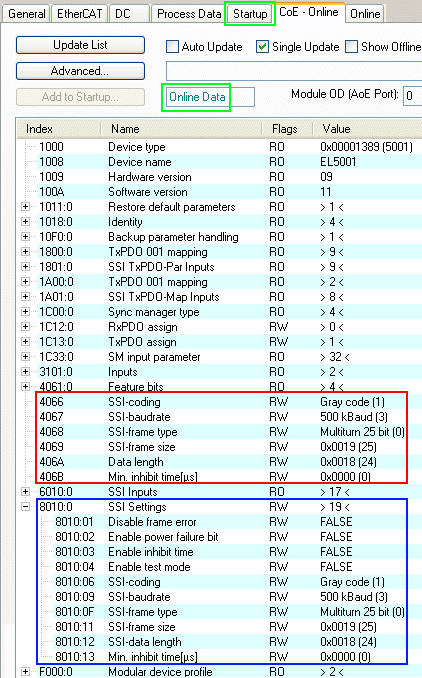 Fig.140: CoE settings and EL500x process data in TwinCAT 2.11
- red: adjustment range of the objects 0x4060ff.
- blue: adjustment range of objects 0x8010 with subindices.
- green: OnlineData means that the data from the EL terminal is currently displayed, in contrast to the offline data from the XML description/ESI file if the terminal is not physically connected, for example.
All permanently desired changes in the CoE should be entered in the StartUp list - this means that the settings are reloaded into the EL terminal each time TwinCAT is restarted. Otherwise the settings would be lost if the device is replaced.
SSI settings
- Index 0x8000:01, disable frame error
If the bit is set to TRUE, data errors such as invalid telegram size are no longer shown in the Data error process record. - Index 0x8000:02, enable power failure bit
If the bit is set to TRUE, the last bit (LSB) in the SSI telegram is interpreted as PowerFail bit of the SSI slave and shown in the process data. - Index 0x8000:03, enable inhibit time
If the bit is set to TRUE, the system waits at least until the inhibit time has elapsed when the next SSI communication starts (index 0x8010:13), even if the next start request has already been issued via EtherCAT or distributed clocks. - Index 0x8000:04, enable test mode
Only for production purposes. - Index 0x8000:06/ Index 0x4066, SSI encoding
Dual or gray coding setting (standard). - Index 0x8000:09/ Index 0x4067, SSI baud rate
should be set to 125, 250, 500 kbaud (default) or 1 Mbaud. - Index 0x8000:0F/ Index 0x4068, SSI frame type
25, 13 or variable bit width (default: 25). - Index 0x8000:11/ Index 0x4069, SSI frame size
Total data volume including PowerFail bit. - Index 0x8000:12/ Index 0x406A, SSI data length
Data volume without PowerFail bit - Index 0x8000:13/ Index 0x406B, min. inhibit time [µs]
See index 0x8000:03.
The total size of the data depends on the encoder used. It is also type-specific whether a power-fail bit or another auxiliary bit is supported. The counter value 0x6010:11 "Counter Value" is determined on the basis of the value entered in the index 0x80n0:12 "SSI data length".
A few example configurations are shown below:
Specification of the | Settings in the CoE of the EL500x | |||||
|---|---|---|---|---|---|---|
ST | MT | Error bit | 0x8010:0F | 0x8010:11 SSI-frame size | 0x8010:12 SSI-data length | 0x8010:02 |
13 | 0 | 0 | 1: Single-turn analysis is active | 13 | 13 | 0: Power failure bit is not active |
12 | 12 | 1 | 0: Multi-turn analysis is active | 25 | 24 | 1: Power failure bit is active |
12 | 12 | 0 | 2: Variable analysis is active | 24 | 24 | 0: Power failure bit is not active |
13 | 12 | 0 | 2: Variable analysis is active | 25 | 25 | 0: Power failure bit is not active |
16 | 16 | 0 | 2: Variable analysis is active | 32 | 32 | 0: Power failure bit is not active |
16 | 0 | 0 | 2: Variable analysis is active | 16 | 16 | 0: Power failure bit is not active |
13 | 16 | 1 | 2: Variable analysis is active | 30 | 29 | 1: Power failure bit is active |
12 | 12 | 2 | 2: Variable analysis is active | 26* | 26* | 0: Power failure bit is not active |
*) Analysis of the data and division into position and auxiliary bits must take place in the PLC
If the encoder offers more than one additional bit, this can be done by appropriate configuration in index 0x80n0:11 "SSI-frame size" and 0x80n0:12 "SSI-data length". The maximum size of 32 bits must be considered here. If the parameters are of the same size, then not only the position, but also the auxiliary bits are displayed in "Counter Value". Analysis of the data and division into position and auxiliary bits must take place in the PLC.
If the settings are not made correctly in the CoE, or if there is an error at the inputs, this is indicated via the status bits:
Data Error | Frame error | Possible error type |
|---|---|---|
TRUE | FALSE | Error at the SSI input:
If no data transmission takes place the SSI input of the terminal is on low level. |
FALSE | TRUE | There is an incorrect data frame, the data frame was not terminated with zero, or possibly
|
TRUE | TRUE |
|
FALSE | FALSE | If bits in the counter value are shifted despite correct CoE parameterization, this may be due to swapped clock lines. |
EL5001: n = 1 for channel 1 | ||
| Velocity calculation from the position data If a velocity or acceleration value is to be determined from the returned position value, it is recommended to use the DC mode for time synchronization. |
Distributed Clocks (DC)
In distributed clock mode the SSI communication is not started with the arrival of the EtherCAT frame, but by the SYNC signal of the slave, which is synchronized via all DC-capable devices in the EtherCAT system. In this way a DC synchronization precision of 100 ns between devices can be achieved. Through further processing in the EL500x the actual start of the SSI communication achieves an accuracy of < ±500 ns relative to the ideal synchronous time.
For more information on the DC system, refer to the Basic EtherCAT documentation.
The minimum EtherCAT cycle time recommendations also apply in DC mode. If the EL500x is operated faster than the time required for SSI communication and processing, this is indicated through the SyncError status bit.
The DC mode is set under the DC tab and becomes active after a TwinCAT restart or reload.
| Optimized jitter from firmware 03 (EL5002-0000-0020) The device-specific time jitter of the EL5002 has been optimized to a maximum value of ±100 ns. See chapter "Basic function principles and notes" |
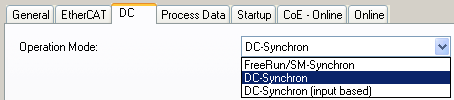 Fig.141: DC mode settings
Process data
For each channel the EL500x offers the position value (4 bytes) and status information (1 or 2 bytes). A differentiation should be made:
- EL5001 up to FW10 only support the simple process image consisting of value and 1 status byte
- EL5001 from FW11 and EL5002 optionally support value and 2 status bytes. The first 8 bit references are retained, although they are complemented by further information in the high byte.
In the following example are three EL5001 devices are configured in order to illustrate the differences.
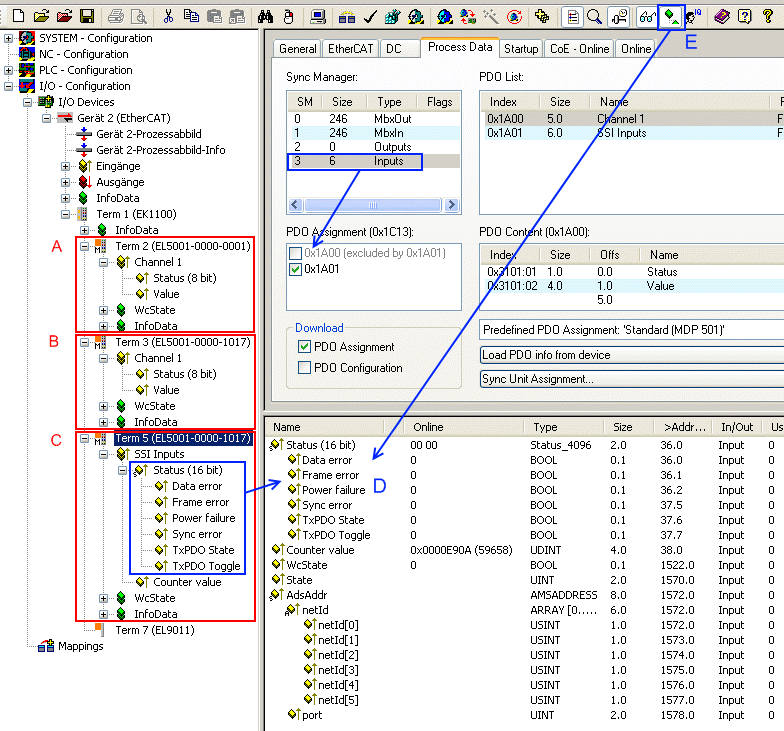 Fig.142: EL500x process data
- Terminal A, EL5001-0000-0001
only support for 1 status byte. - Terminal B, EL5001-0000-1017
also existing process image (default). - Terminal C, EL5001-0000-1017 with converted interface
In SyncManager 3 (inputs, blue) the PDO assignment of object 0x1A00 (default) was changed to object 0x1A01, representing 2-byte status.
In addition the status word can be split into individually linkable bits under TwinCAT 2.11, so that the bit references can be read in plain text during commissioning.
In order to see the subvariables in the online overview (D), mode "Show Sub Variables" must be activated (E).
| SubVariables and TwinCAT 2.10 Under TwinCAT 2.10 the consolidated representation of subvariables as shown for 16-bit status in Fig. EL500x process data is not possible. Only the individually linkable bits are shown. |
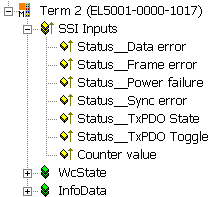 Fig.143: Representation of the SSI inputs in the TwinCAT tree
Start of SSI communication
If the start time of the SSI communication is of interest, it can be calculated in the control system (TwinCAT 2.11 or higher). The following functions must be activated in the terminal:
System Manager | EL500x | Advanced settings | Behavior | IncludeDcShiftTimes = TRUE
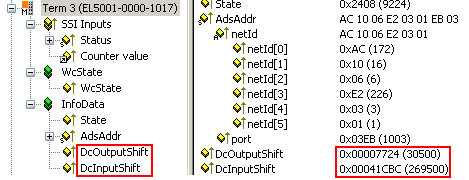 Fig.144: EL500x shift times
Through this setting the System Manager specifies for each terminal the fixed offset/shift between the local sync signal and the master-side DC sync in [µs]. This value is constant at runtime. Depending on the DC mode (InputBased or not) the local time of the SSI start may be cyclically calculated as follows, for example:
StartSSI = DCPLC + DcInputShift
This calculation must be performed in each PLC cycle. Further information can be found under Basic EtherCAT documentation.