Configuration for EtherCAT
The EP9521-0020 fulfills the following requirements for use as an EtherCAT media converter:
- Constant low propagation delay of the frames, regardless of the frame length
- Fast link detection when the connection is established and interrupted
- Identification as separate EtherCAT device with diagnostic function
Before commissioning, set the desired running direction of the EtherCAT frames using rotary switch S1:
Rotary switch S1 | Switch position | Running direction of the EtherCAT frames | |
|---|---|---|---|
| 0 | X2 ► X1 ► X3 |
|
| 2 | X1 ► X3 ► X2 |
|
| 5 | X1 ► X2 ► X3 |
|

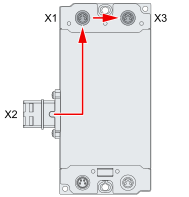

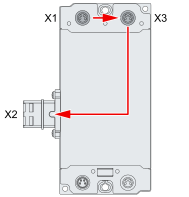

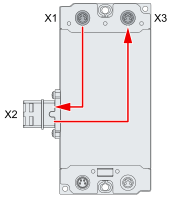
Example
In the following illustration, the EP9521-0020 are operated as follows:
- The left EP9521-0020 as a copper to fiber optic media converter (S1 = 5)
- The right-hand EP9521-0020 as a fiber optic to copper media converter (S1 = 0)
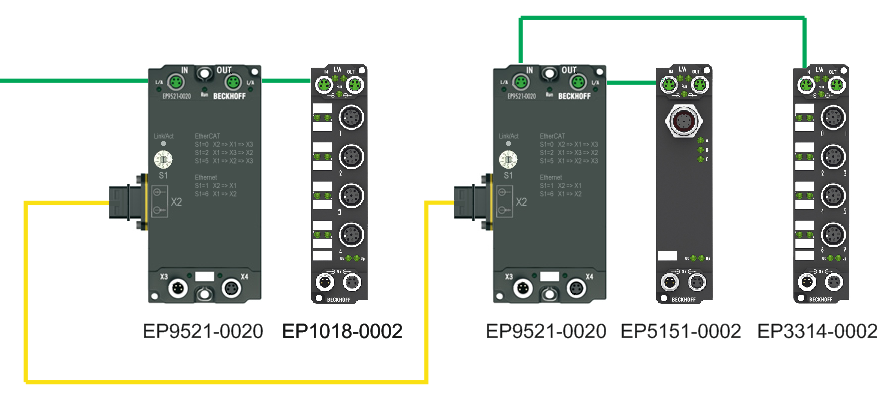
The running direction of the EtherCAT frame is thus as follows:
MASTER ► X1 (EP9521_1) ► X2(EP9521_1) ► X2(EP9521_2) ► X1(EP3314) ► X3(EP5151) ► X3(EP9521_1) ► X2(EP9521_1) ► X3(EP1018) ► MASTER
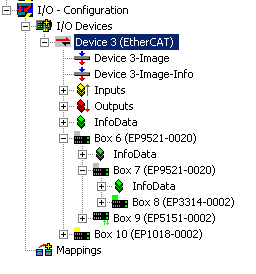
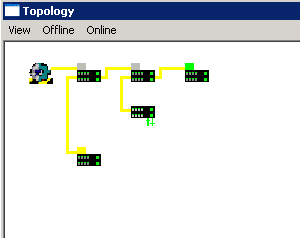
In TwinCAT, the network structure is represented as follows:
- Solution Explorer:
- Topology view:
If the opposite direction of rotation is set, the subsequent behavior depends on the EtherCAT master. The scanned EP9521-0020 may be inserted at a different position in the topology, or an INIT_VPRS error message of the EtherCAT master may occur.