Setting up: Real-time Ethernet (Publisher/Subscriber, EAP push)
|
Table of contents |
|---|
Notes on the device
- An EAP adapter must be created in the configuration in order to operate a CU2508 downlink port as a publisher/subscriber device of EAP real-time Ethernet telegrams ("network variables").
- Attention is to be paid to the general notes on the EAP/Publisher/Subscriber procedure.
- The EAP (EtherCAT Automation Protocol) is operated here in the so-called push mode as opposed to the so-called polling mode for flexible data transfer.
- At least TwinCAT 2.11R3 is required for operation on the master side.
Setting up the real-time Ethernet device
For the setup a real-time Ethernet adapter is to be created as usual.
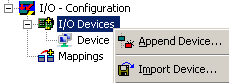 Fig.53: Creating a new device
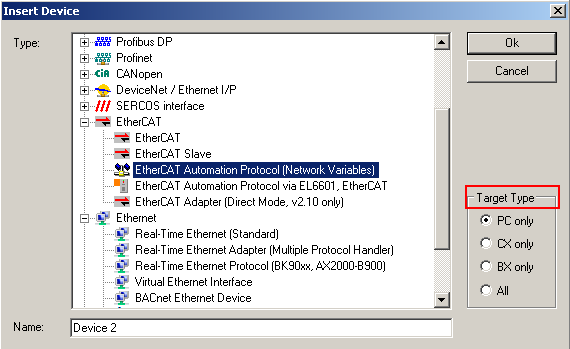 Fig.54: Selection of the adapter for EAP
If not all devices are offered, the target platform can be selected via TargetType.
Not an actual port of the PC, but rather a virtual adapter of the CU2508 is then merely selected as the Ethernet adapter for the CU2508.
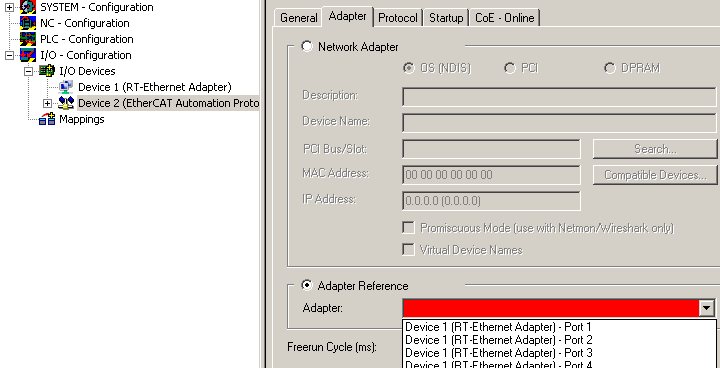 Fig.55: Selection of the Ethernet adapter
The number of available ports (in this case 4) depends on the settings of the CU2508 device (see there).
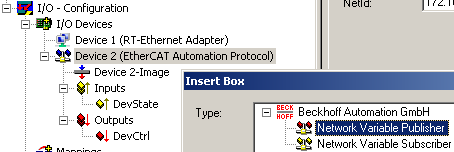 Fig.56: Adding the Ethernet devices
Subsequently the required Ethernet couplers/boxes/drives can be manually added or scanned. Before a scan TwinCAT should be restarted once in the Config/FreeRun mode.