Standard Window Drive
This module is used to control window drives.
Settings
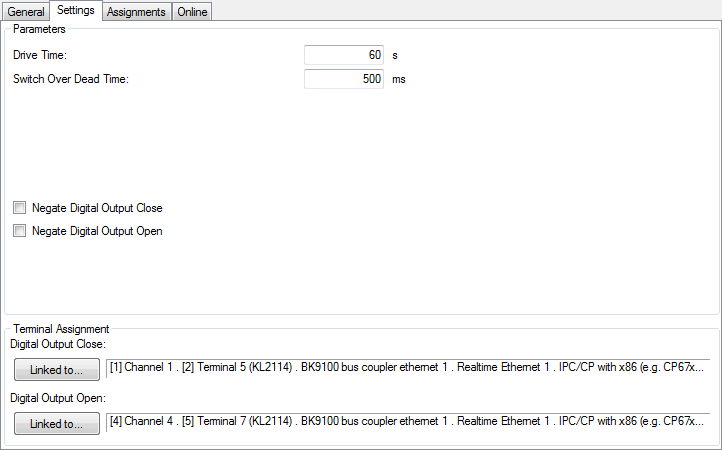
Parameters
- Drive Time: Total driving time of the window.
- Switch Over Dead Time: Waiting time when the driving direction is changed abruptly.
- Negate Digital Output Close/Open: Inverts the control outputs, so a low-signal at the output-module is driving the window.
Online
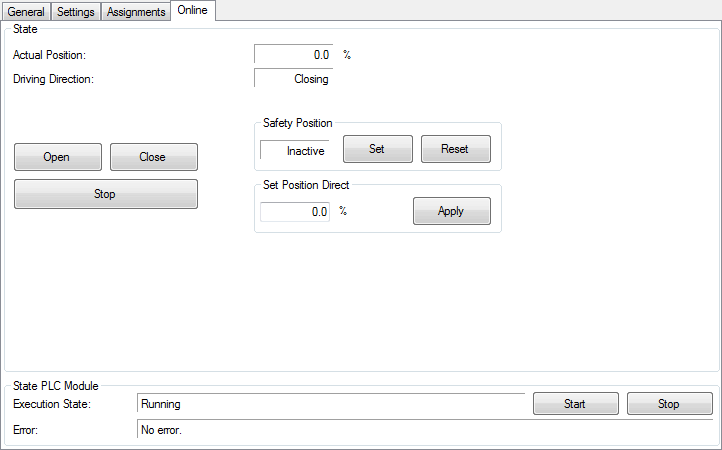
Commands
- Open: Opens the window.
- Close: Closes the window.
- Stop: Driving the window will be stopped.
- Safety Position Set: Driving to safety-position is activated. For this purpose the window will be driven in close-direction for the entered drive-time + 10%. No other commands except Safety Position Reset are accepted then.
- Safety Position Reset: Releases the safety-position lock. All other commands are accessible again.
- Set Position Direct: The window will be driven to the entered value, when the Apply-button is pressed. 0% means completely closed, 100% completely opened.
State
- Actual Position: Actual position in %. 0% means completely closed, 100% completely opened.
- Driving Direction: Actual movement.
State PLC Module
- Execution State: Shows, if the module is running or stopped.
- Error: In case of an error, the error code and the error parameter are displayed in this box.
- Start/Stop: Starts/stops the module.