- KL3208, KL3228 - Eight channel input terminals for PT1000, NI1000, NTC
- Configuration Software KS2000
- Parameterization with KS2000
Parameterization with KS2000
Connect the configuration interface of your fieldbus coupler with the serial interface of your PC via the configuration cable and start the KS2000 Configuration Software.
| Click on the Login button. The configuration software will now load the information for the connected fieldbus station.
|

 | Display of the KL3228 in KS2000 The KL3228 eight-channel analog terminal is displayed by the KS2000 Configuration Software as two four-channel analog terminals. |
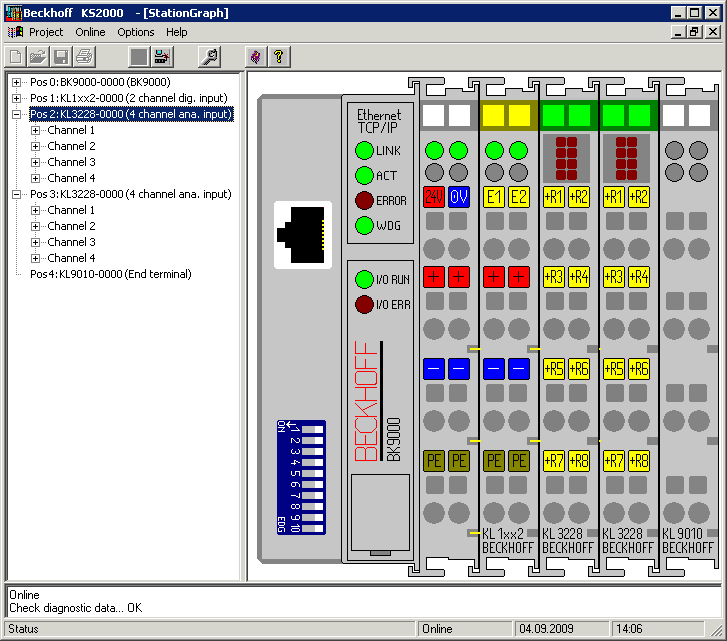
The left-hand KS2000 window displays the terminals of the fieldbus station in a tree structure.
The right-hand KS2000 window contains a graphic display of the fieldbus station terminals.
In the tree structure of the left-hand window, click on the plus-sign next to the terminal whose parameters you wish to change (item 2 in the example).
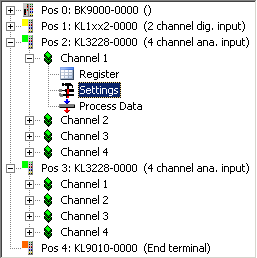
For the KL3214, the branches Register, Settings and ProcData are displayed:
- Register enables direct access to the KL3228 registers.
- A dialog mask for the parameterization of the KL3228 can be found under Settings.
- ProcData displays the KL3228 process data.