Smart View
This dialog shows the settings that are stored in the EEPROM of the EtherCAT Slave Controller (ESC).
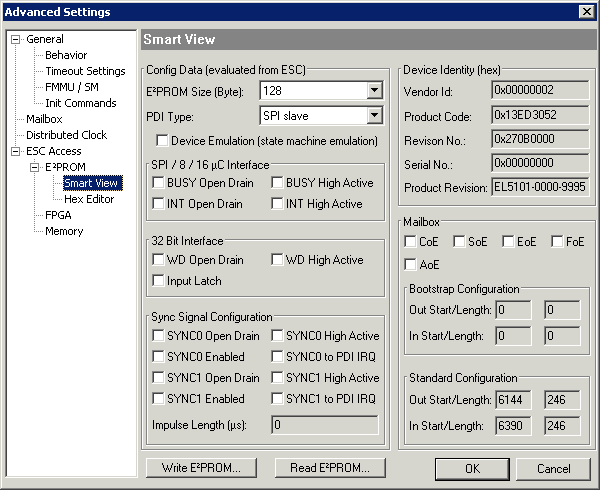 Fig.342: Advanced Settings: "Smart View" dialog
Config Data (evaluated from ESC)
This section shows internal parameters of the EtherCAT Slave Controller (ESC).
- EEPROM Size (Byte): Size of the EEPROM in bytes
- PDI Type: Type of process data interface
- Device Emulation (state machine emulation)
SPI / 8 / 18 µC Interface
This section shows internal parameters of the 16 bit process data interface:
- BUSY Open Drain
- BUSY High Active
- INT Open Drain
- INT High Active
32 Bit Interface
This section shows internal parameters of the 32 bit process data interface:
- WD Open Drain: Watchdog Open Drain
- WD High Active: Watchdog Open High Active
- Input Latch
Sync Signal Configuration
This section shows internal parameters for configuring the Sync signal:
- Sync 0 Open Drain
- Sync 0 High Active
- Sync 0 Enabled
- Sync 0 to PDI IRQ
- Sync 1 Open Drain
- Sync 1 High Active
- Sync 1 Enabled
- Sync 1 to PDI IRQ
EEPROM buttons
- Write EEPROM: Button for writing to the EEPROM.
- Read EEPROM: Button for reading the EEPROM.
Device Identity (hex)
This section shows information for the EtherCAT device.
- Vendor ID: Identification number of the device manufacturer.
- Product Code: Product code of the EtherCAT device.
- Revision No.: Revision number of the EtherCAT device.
- Serial No.: Serial number of the EtherCAT device.
- Product Revision: Product revision of the EtherCAT device.
Mailbox
Indicates which mailbox communication variants are supported.
- CoE: CanOpen over EtherCAT
- SoE: Servo-Profile over EtherCAT
- EoE: Ethernet via EtherCAT
- FoE: Servo-Profile over EtherCAT
- AoE: ADS over EtherCAT
Bootstrap Configuration
Configuration for Bootstrap mode (e.g. firmware update)
- Out Start/Length
- In Start/Length
Standard Configuration
Configuration for regular operation (process data transfer or mailbox operation)
- Out Start/Length
- In Start/Length