Serial Communication
Serial communication enables data acquisition as per RS232/RS485 via a COM port (64 bytes), the KL6031/KL6041 (22 bytes) or the KL6001/KL6021 (5 bytes).
Settings
Parameter settings of Type 1 - RS232/RS485 via COM Port (64 Bytes).
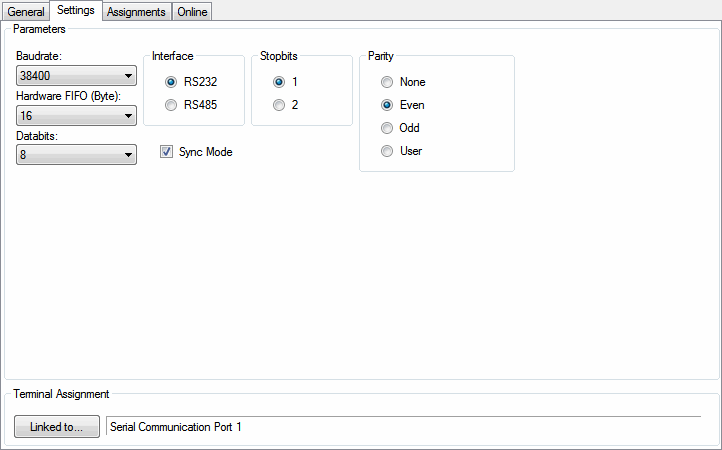
Parameters
- Baudrate: Select the desired baud rate. The following values are available: 50, 75, 110, 150, 300, 600, 1200, 2400, 4800, 9600, 14400, 19200, 38400, 57600, 115200, 230400, 460800.
- Hardware FIFO (Byte): Select the desired byte size of the Fifo. The following values are available: 16, 128.
- Databits: Select the desired number of data bits per byte. The following values are available: 8, 7, 6, 5.
- Interface: Select the type of RS to be used. The following values are available: RS232, RS485.
- Stopbits: Select the desired number of stop bits. The following values are available: 1, 2.
- Parity: Select the parity test to be used. The following options are available: None, Even, Odd, User.
- Sync Mode: The exchange of process data with the PLC is synchronised if Sync Mode is switched on.
Pressing the Linked to...-button opens a dialog, where the designated serial communication port can be assigned to this module.
In case of using RS232/RS485 via KL6031/KL6041 or KL6001/KL6021, there are no parameters to configure. Only select the appropriate channel of the terminal and it will be assigned to this module.
Online
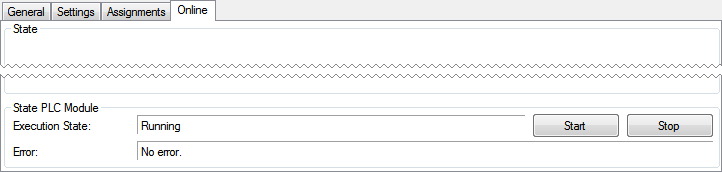
State PLC Module
- Execution State: Shows if the module is running or stopped.
- Error: In case of an error, the error code and the error parameter are displayed in this box.
- Start/Stop: Starts/stops the module.
This behavior is the same for RS232/RS485 via KL6031/KL6041 and KL6001/KL6021.