LED Displays
CU1123-00x0, CU1124 - LEDs
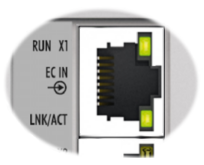
- The green RUN-LED indicates the state of the EtherCAT State Machine. It is located at the top of the first RJ45-port (X1).
- The green LNK/ACT-LEDs indicate the current state of each channel. They are located at the bottom of each RJ45-port.
LED | Color | Display | Description |
|---|---|---|---|
RUN | green | off | State of the EtherCAT State Machine: INIT = initialization of the terminal |
flashing | State of the EtherCAT State Machine: PREOP = function for mailbox communication and different default settings set | ||
single flash | State of the EtherCAT State Machine: SAFEOP = verification of the Sync Manager channels and the distributed clocks. | ||
on | State of the EtherCAT State Machine: OP = normal operating state; mailbox and process data communication is possible | ||
flickering | State of the EtherCAT State Machine: BOOTSTRAP = a firmware is loaded | ||
LNK/ACT | green | off | No connection |
on | Connection available (link) | ||
flashing | Data transfer (act) |
CU1128 - LEDs
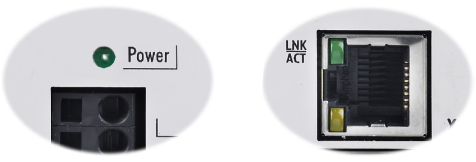
- The green Power LED indicates the presence of the supply voltage (24 VDC).
- The green LNK/ACT-LEDs indicate the current state of each channel. They are located at the bottom of the RJ45-ports X1…X4 and on the top of the RJ45-ports X5…X8.
LED | Color | Display | Description |
|---|---|---|---|
LNK/ACT | green | off | No connection |
on | Connection available (link) | ||
flashing | Data transfer (act) |