Groups
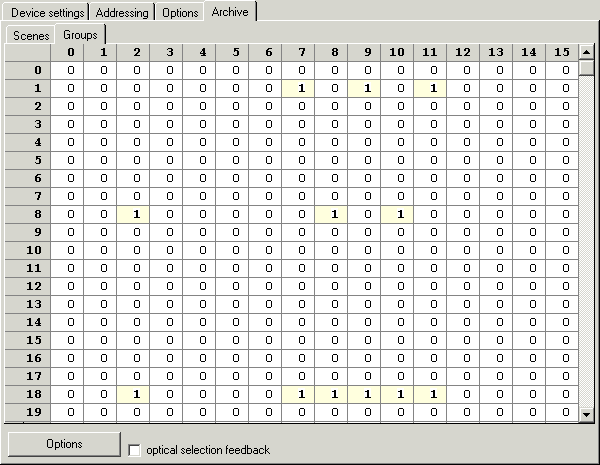
Here you specify the association for up to 16 groups (listed horizontally) for up to 64 DALI devices (listed vertically).
The following entries are valid:
- 1: DALI device belongs to a group
- 0: DALI device does not belong to a group
In the example shown,
- DALI device 1 is assigned to groups 7, 9 and 11;
- DALI device 8 is assigned to groups 2, 8 and 10;
- DALI device 18 is assigned to groups 2, 7, 8, 9, 10 and 11;
Visual selection feedback
If the option visual selection feedback is enabled and you click on a group number, the brightness of all DALI devices of this group is set to maximum.
This also requires Online Monitoring to be enabled under Options in the KS2000, and the I/O Run LED on the Bus Coupler must be on.
Options

Open
Opens a configuration stored on the hard disk of the PC (*.xml).
Save
Saves the configuration in a file (*.xml) on the hard disk of the PC.
Download
Saves the configuration in the connected DALI devices.
Upload
Loads the configuration from the connected DALI devices.