Changing the slave parameters in the CoE directory
During commissioning it may be necessary to change the CoE parameters.
- If the terminal is accessed online, the CoE directory is read from the slave and can be changed, example EL3201, see fig. Accessing the CoE parameters in the TwinCAT System Manager, example EL3201.
- If the terminal is accessed offline (the terminal is then not addressable) the data from the XML description is used. The parameters cannot be changed.
The CoE parameters (CAN over EtherCAT) can be changed in the "CoE-Online" tab of the EtherCAT slave.
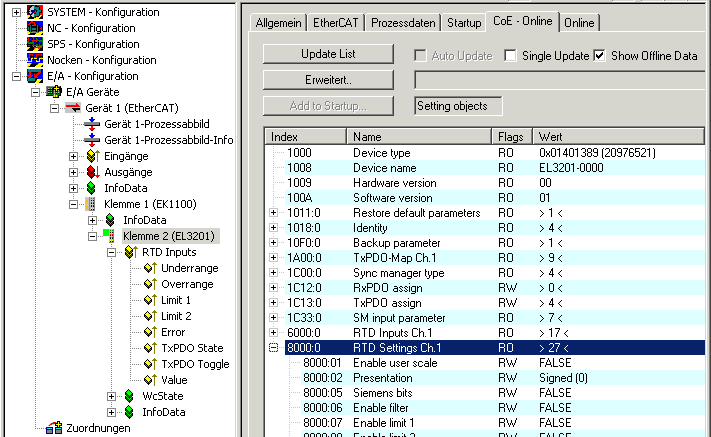 Fig.136: Accessing the CoE parameters in TwinCAT System Manager, example EL3201
Notice | |
Changes in the CoE directory, in the case of exchange So that, in the case of exchanging an EtherCAT slave, the CoE parameters are set correctly in the new slave, changes on the customer side must be entered in the start-up list. |
 | Changes in the CoE directory, program access The CoE parameters can also be read and written during operation (insofar as it makes sense) by the PLC using corresponding control commands. For details, see the corresponding articles in the Beckhoff Information System, for example. |
For detailed information on settings and operation modes, please read the chapter "Process data and operation modes".