Notes on connection technology
| |
Risk of electric shock and damage of device! Bring the bus terminal system into a safe, powered down state before starting installation, disassembly or wiring of the bus terminals! |

Plug and unplug the wire
- The wire is connected using the direct plug-in technique,
- i.e. no tools required for solid wires and ferrules, the wire is simply inserted into the contact point after stripping
- Free stranded wire ends can also be connected in this way; in this case the wire clamping mechanism has to be opened by operating the pushing device.
- Like in standard terminals, the wires are released via the contact release device, using a screwdriver or pushing device (see Fig. A below).
Notice The cables must not be live or plugged/unplugged under load.
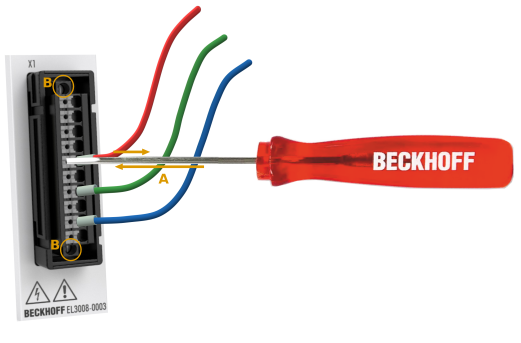
The permitted wire cross-sections and the strip length are shown in the following table.
Wire cross-section (solid wire) | 0.14 ... 1.5 mm2 |
Cable cross-section (stranded wire) | 0.14 ... 1.5 mm2 |
Cable cross-section (stranded wire) | 0.28 ... 1.0 mm2 (with ferrule with plastic collar) |
Cable cross-section (stranded wire) | 0.25 ... 1.0 mm2 (with ferrule without plastic collar) |
Current carrying capacity, continuous | 10 A (according to UL, AWG 26 ... 16) |
Strip length | 8 ... 9 mm / 0.31 – 0.35 in |
Insert and pull the push-in maintenance plug
The push-in plug is already supplied in the terminal.
The push-in plug is designed as a service plug. Maximum number of mating cycles: 25
For maintenance purposes, e.g. during service, the entire plug-in body can be removed from the Beckhoff terminal without releasing the individual wires.
- To do this, use a screwdriver (e.g. Beckhoff ZB8700) to loosen the two screws and carefully pull out the plug-in body by the wires (see fig. above B).
- Meticulous cleanliness must be ensured when the connector is re-inserted. Do not touch the pins in the device tray.
- Push in the connector until it engages audibly and the front of the plug is flush with the housing.
- Tighten the two screws to a torque of 0.15-0.20 Nm.
Notice The service plug also has no specified switching capacity and must not be plugged/unplugged live or under load.